
Saree catalogue design: show the border first
A good saree catalogue design shows the border, the fabric and the price on every page. Open a free template like Festive Fold, add your photos and send it.
A saree buyer looks at the border before the price. Then the pallu, then the fabric. A good saree catalogue design puts those three things where the eye lands first.
This guide shows free saree catalogue templates as finished pages. You open one, add your own photos and prices, and send it as a PDF or a link. The photos in the examples are sample photos. Yours take their place.
What saree buyers want to see
- The border and the pallu up close. Many buyers choose by the border alone.
- The whole saree folded or draped, in good light, so the colour is true.
- The fabric in plain words: silk, cotton, georgette or a blend.
- What comes with it: a blouse piece, and fall and pico (the edge stitching).
- A price and a code, so they can order in one message.
Festive Fold: for silk and festive sarees
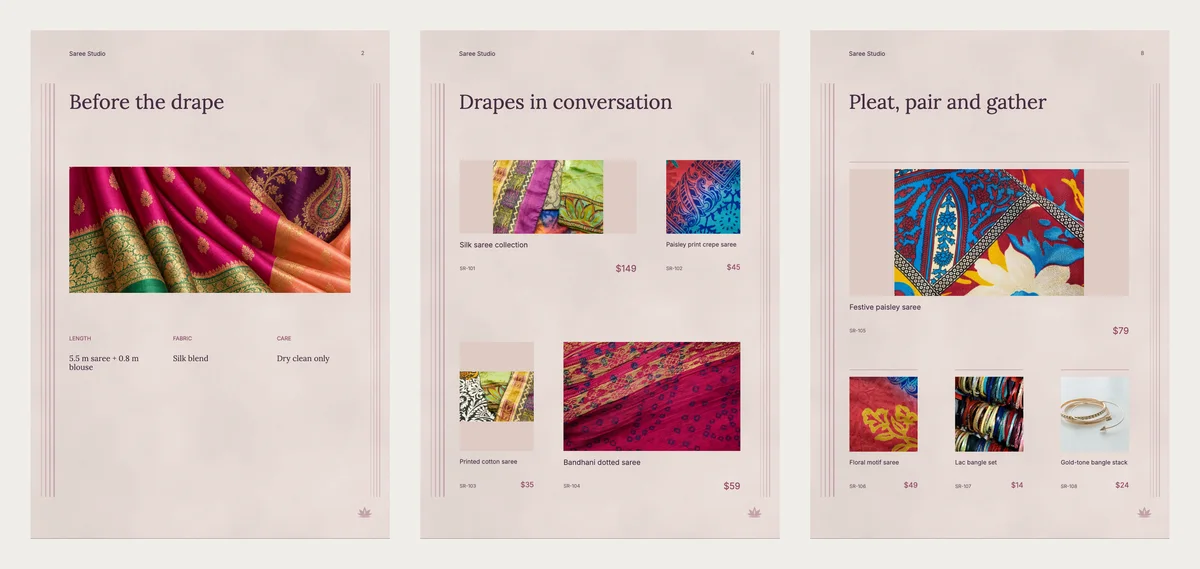
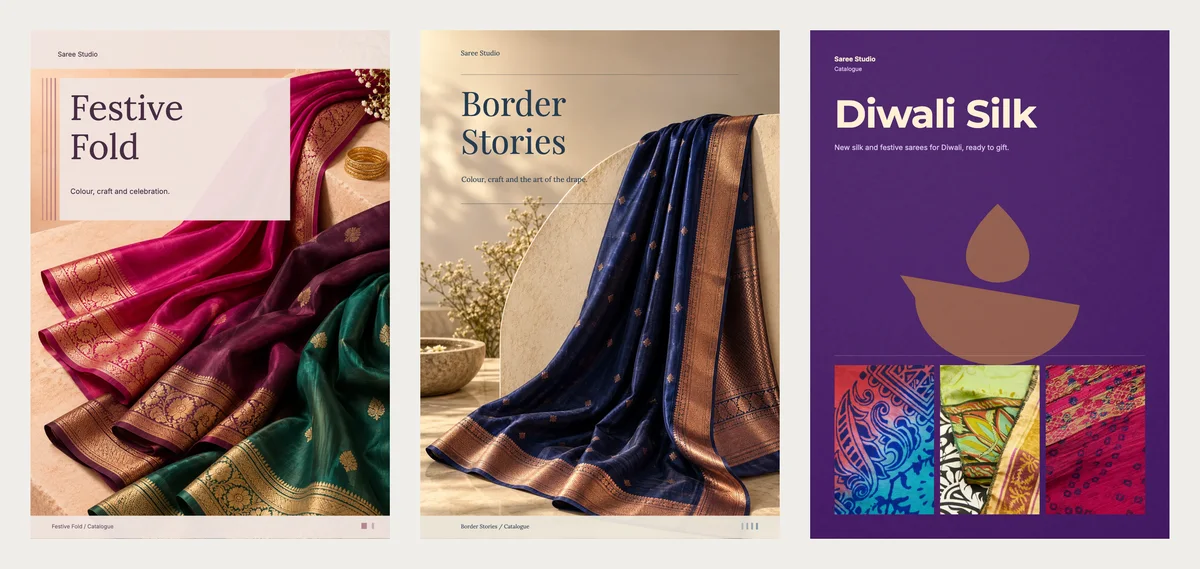
Festive Fold is one of the newest designs. It has soft blush pages with thin rose lines down the sides. The cover is one big photo of folded silk, with the title in a pale box. The pages stay calm, so the colour of your sarees stands out.
The sample has 12 pages. The second page, "Before the drape", has three short notes under a photo: length, fabric and care. A page of four sarees shows each one with its code and price. Another page puts a saree next to bangles, so a buyer sees the full look. At the back, one page lists every saree with its price. The next page tells buyers how to order in three steps.
Border Stories: quiet and rich
Border Stories uses warm stone colours with navy titles. The cover shows one navy silk saree with a copper border. Inside, a "Drape particulars" page holds the length, fabric and care next to a tall photo. It suits a shop that sells fewer, finer sarees, like handloom silk.
Diwali Silk: for the festival rush
Diwali Silk is deep purple with gold and a lit diya. Three photos sit on the cover, so people see your range at once. Send it two or three weeks before Diwali, which falls on 8 November this year. For more festival designs, see the Diwali templates.
Three more looks
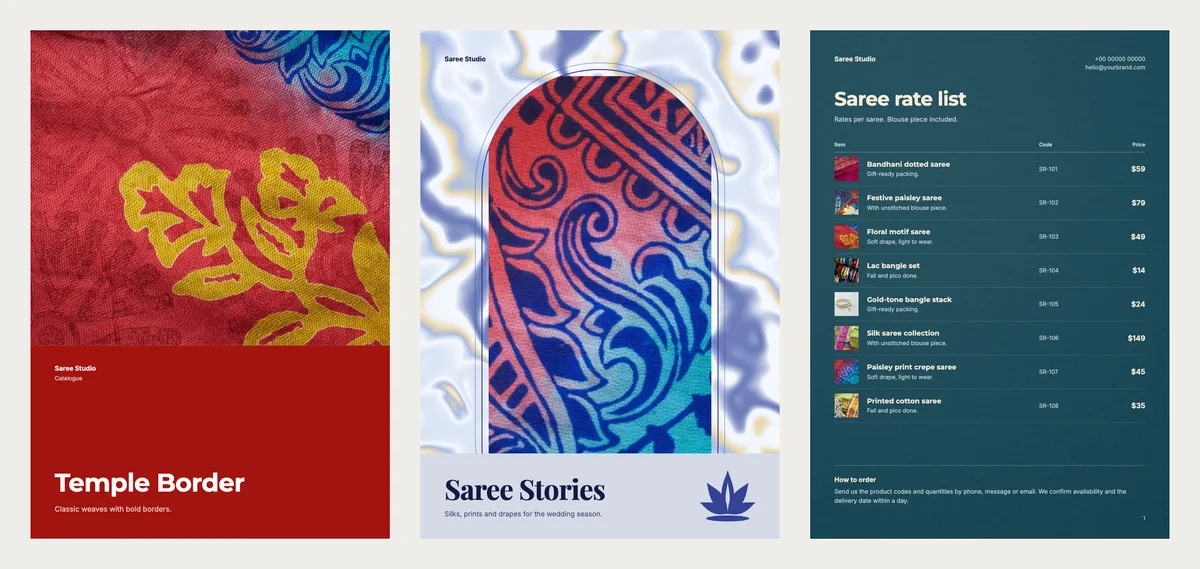
Temple Border has cream inside pages and a bold red band, like a saree border. It suits classic weaves.
Lotus Arch is a lookbook in pale silk blue. A lookbook is a book of big photos with short captions. Most photos sit in arch-shaped frames. Use it for a wedding season collection.
Peacock Rate Card is a one-page rate list in peacock blue. It suits regular buyers who know your sarees and only want the prices.
Quick pick
| If you sell | Pick | Format |
|---|---|---|
| Silk and festive sarees | Festive Fold | Catalogue |
| A few fine handloom sarees | Border Stories | Catalogue |
| Gift sarees for Diwali | Diwali Silk | Catalogue |
| Classic weaves with bold borders | Temple Border | Catalogue |
| A wedding collection | Lotus Arch | Lookbook |
| Prices for regular buyers | Peacock Rate Card | Price list |
What to write under each saree
Keep each saree to a name, one short line and a price. Put the fabric or what comes with it in the short line.
| Name | Short line | Price |
|---|---|---|
| Bandhani dotted saree | Silk blend, blouse piece included | $59 |
| Paisley print crepe saree | Soft drape, light to wear | $45 |
| Silk saree collection | Fall and pico done | $149 |
Example prices are in US dollars, like the templates. Write your own price in your own money. Give each saree a code, like SR-104. A buyer can then just send "SR-104, please".
Photo tips for sarees
- Take one photo of the whole saree, folded or draped, near a window in daylight.
- Take one close photo of the border and one of the pallu.
- Use the same plain background for every saree.
- Skip filters. Buyers want the true colour.
In CatalogLeaf, drop the close photos onto the same saree to give it extra photos. See more photos for one product.
A page order that works
- The cover, with your best saree.
- A short page about your shop and what comes with each saree.
- Sarees grouped by fabric or by occasion.
- Bangles or blouses to match, if you sell them.
- The full list with prices.
- How to order, with your phone number.
Make your saree catalogue in CatalogLeaf
- Open a design above and click Use with my photos.
- Add your photos. Type a name and a price for each one.
- Click Next: choose a look, type your shop name and click Create catalog.
Your catalogue opens in the editor. The cover picture is a sample. To use your own, open the cover page and click Change next to Background photo. Then change the sample phone, email and address on the last page to your own.
Selling bridal sarees too? See wedding catalogue design. Open Festive Fold, add your three best sarees and send it to one customer today.