
Bakery catalogue design: pick a look by what you sell
A good bakery catalogue design makes people hungry and tells them how to order. Pick one of nine free templates by what you bake, add your photos and send it.
Most people choose a cake with their eyes first. A bakery catalogue lets them do that at home, then message you with the one they want.
This post shows nine free bakery catalogue design templates. Each is a finished design. You open it, add your own photos and prices, and send it. The photos in the examples are sample photos. Yours take their place.
Quick pick
| If you sell | Pick | Format |
|---|---|---|
| Celebration cakes made to order | Celebration Cakes | Catalogue |
| Tarts, macarons and small desserts | Pâtisserie | Catalogue |
| A few cake designs, one per page | Cake Studio | Lookbook |
| A full range with a premium feel | Butter Studio | Catalogue |
| Chocolate, brownies, rich bakes | Cocoa Ledger or Chocolate House | Catalogue |
| Bread and cafe food | Sourdough & Co. | Catalogue |
| Party cakes, cupcakes, doughnuts | Sprinkles | Catalogue |
| Sweets and festival boxes | Mithai House | Catalogue |
For a rich, premium look
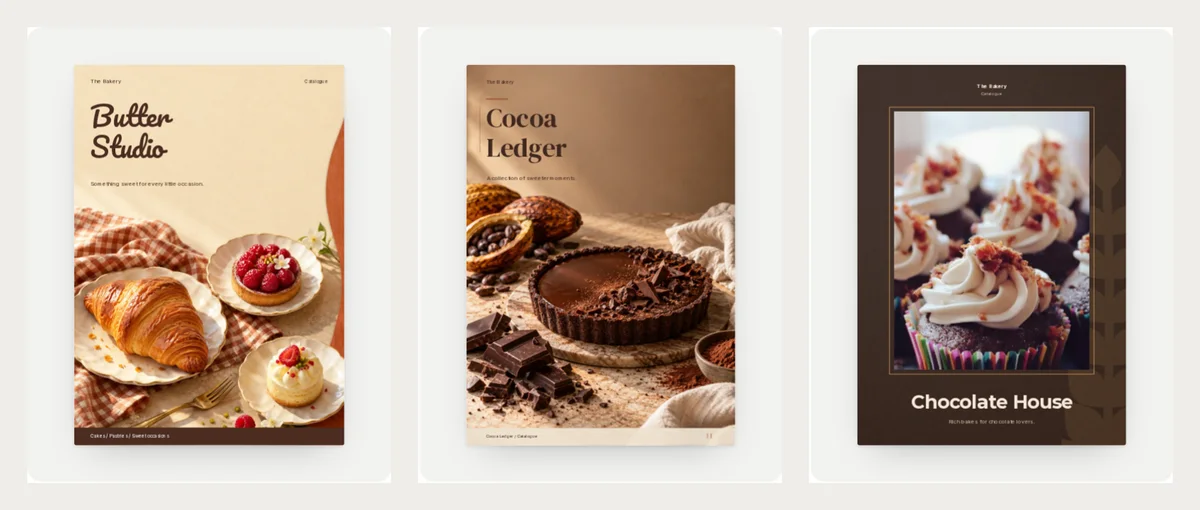
These three suit a bakery that wants to look special. People expect to pay a little more for a bake that looks this good.
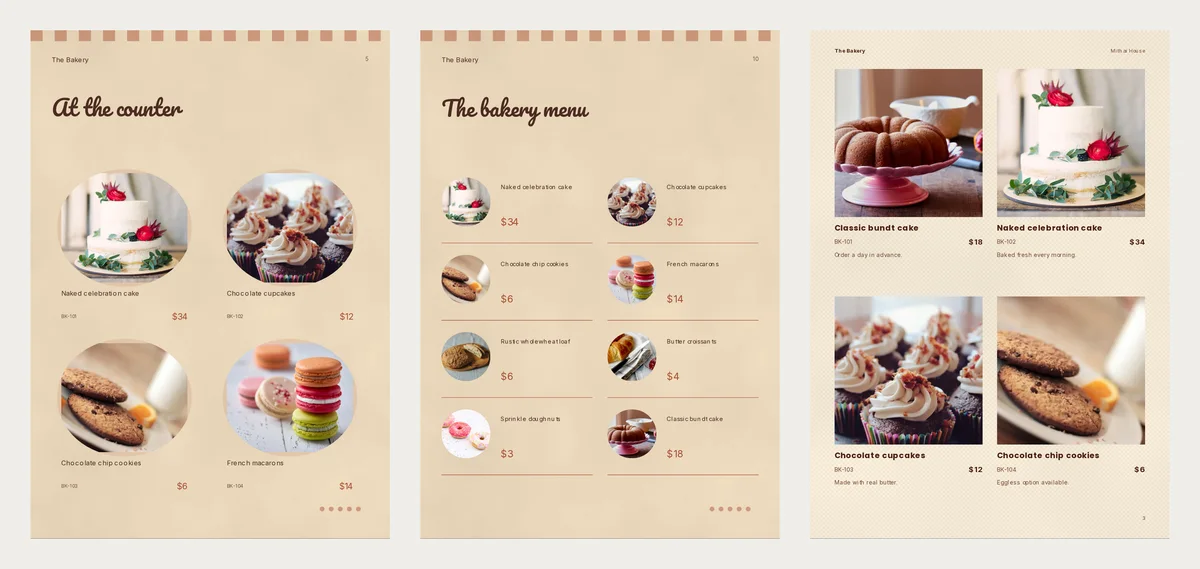
Butter Studio has warm cream pages with a striped edge. It shows bakes in round frames and has a "Good to know" page for servings, allergens and order time. It suits a shop with many small items.
Cocoa Ledger is brown and quiet, with a serif title and a clean menu page. It suits a chocolate maker or a patisserie that sells gifts.
Chocolate House is dark chocolate with a thin gold frame around one big photo. It suits cakes and brownies. Use it when you have one very good photo for the cover.
For cakes and desserts
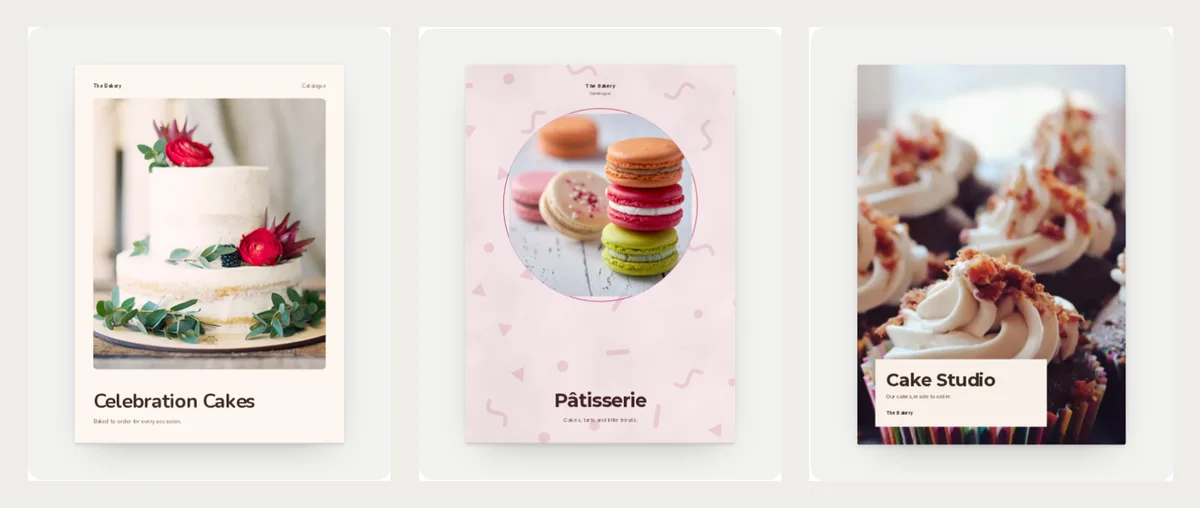
Celebration Cakes is bright and plain. One big cake photo sits on the cover. It suits a home baker who takes orders for birthdays and weddings.
Pâtisserie is soft pink with a round photo and sprinkles. It suits tarts, macarons and little desserts. Photos on a light background look best here.
Cake Studio is a lookbook. Each cake gets a full page. Use it when customers want to choose a design, not a flavour. Under each photo, write the size and how many people it serves.
For bread, parties and sweets
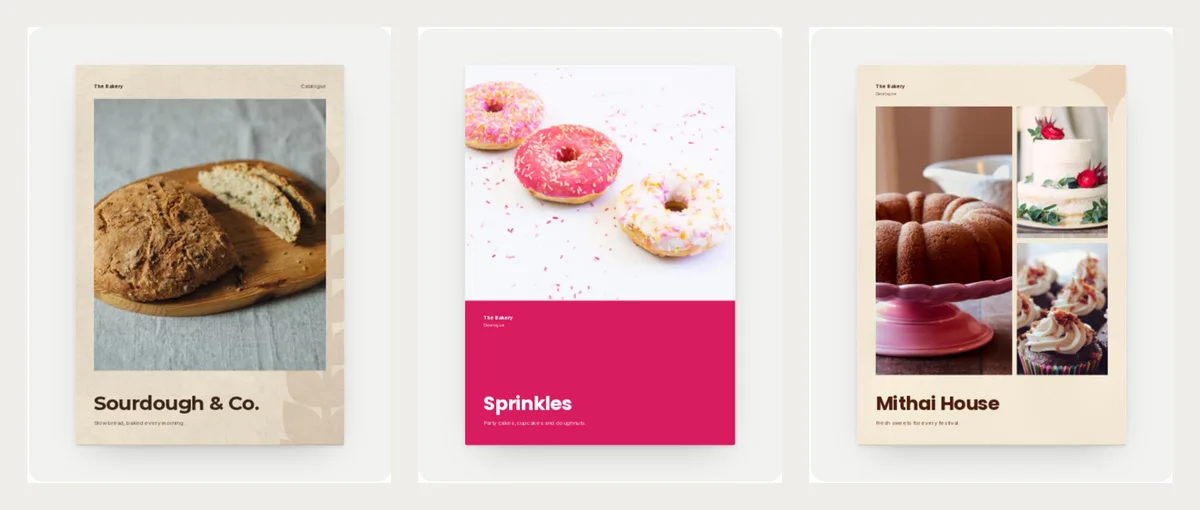
Sourdough & Co. uses kraft paper colours with a wheat pattern. It suits a bread bakery or a small cafe. Write the day each loaf is baked.
Sprinkles has a bold pink band under a big photo. It is made for cupcakes, doughnuts and party boxes. Add the minimum number for an order.
Mithai House is saffron and cream, with three photos on the cover so people see the range at once. It suits sweets and festival boxes. Sending it before a festival works well. See more in Diwali catalogue and flyer templates.
What a bakery catalogue page needs
Keep every item to three things: a name, one short line and a price.
| Name | Short line | Price |
|---|---|---|
| Chocolate cupcakes, box of 6 | Made with real butter | $12 |
| Naked celebration cake | Serves 8-10, order 24 hours ahead | $34 |
| Rustic wholewheat loaf | Baked every morning | $6 |
Example prices are in US dollars, like the templates. Write your own price in your own money.
Add what matters to a food buyer: allergens such as wheat, dairy or eggs, how many people it serves, and how early to order. Customers ask these questions again and again. If the catalogue answers them, you get fewer messages.
A good page order
- Cover: your best photo and your bakery name.
- About you: two lines on who bakes and what is always fresh.
- Best sellers: four items with photo, name and price.
- Full menu: one page of small photos and prices.
- How to order: order time, pickup or delivery, phone and WhatsApp.
Need a simple menu or rate list instead? See bakery menu card design.
Make your bakery catalogue in CatalogLeaf
- Open a design above and click Use with my photos.
- Add your photos. Type a name and a price for each one.
- Click Next: choose a look, type your bakery name and click Create catalog.
Your catalogue opens in the editor. Change the sample phone, email and address on the last page to your own. Then download a PDF or share a link. Not sure which one? Read PDF or flipbook link.
Want to compare more looks? See all the bakery catalogue templates. Pick one, add your best bake and send it to your next customer today.