
Toy catalogue design for parents, gift buyers and shops
A good toy catalogue design starts with the reader. Parents browse a long catalogue, gift buyers want one toy and a price, and other shops want a line sheet. Here are eight free designs, sorted that way.
The usual mistake is one big catalogue for everybody. A grandparent wants one birthday gift under $20. A parent wants to compare twelve toys at home. A shop buying stock to resell wants codes and a minimum order.
So we sorted the free toy templates in CatalogLeaf by reader. Each design below was built with the same eight sample toys.
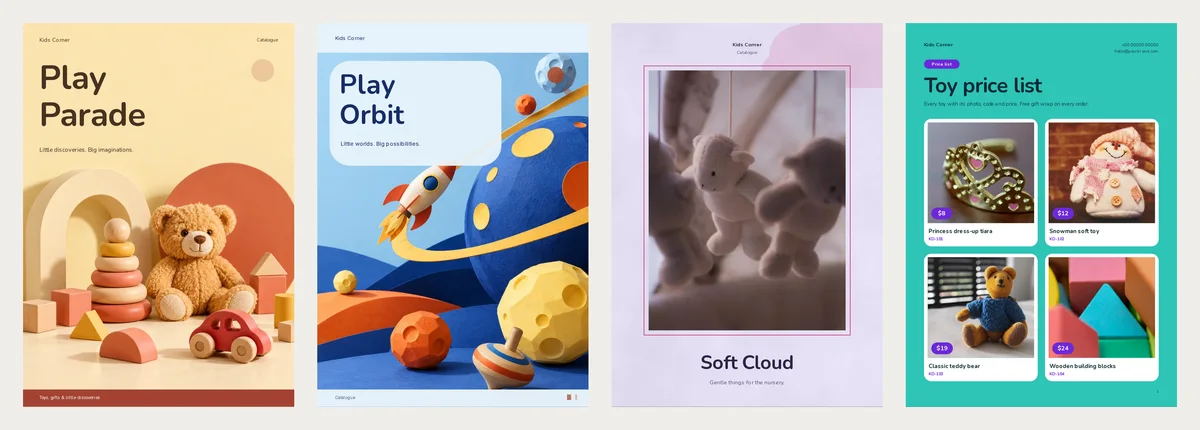
What eight toys turn into
We made a PDF of every design in this run. The sample mixes baby things and toys for older children. For babies, there is a crib mobile and a bassinet. The rest are a teddy, blocks, a wooden bunny set, a tin van, a tiara and a snowman. Compact is the smallest PDF quality.
| Design | What it makes | Pages | Compact | HD |
|---|---|---|---|---|
| Play Parade | Catalogue | 12 | 385 KB | 1.1 MB |
| Play Orbit | Catalogue | 12 | 390 KB | 1.1 MB |
| Soft Cloud | Catalogue | 6 | 310 KB | 727 KB |
| Mint Garden | Catalogue | 6 | 381 KB | 910 KB |
| Toy Box | Price list | 1 | 182 KB | 406 KB |
| Picture Tiles | Price list | 2 | 200 KB | 641 KB |
| Birthday Bash | Flyers | 8 | 369 KB | 744 KB |
| Toy Trade | Line sheet | 2 | 295 KB | 881 KB |
Twelve pages cost only about 200 KB more than one page. Every Compact file stayed under 400 KB, so file size is no reason to cut pages. The HD files were two to three times bigger.
Parents comparing toys at home
Pick Play Parade or Play Orbit. Both make twelve pages from eight toys. Parents compare at home, so the extra pages get read.
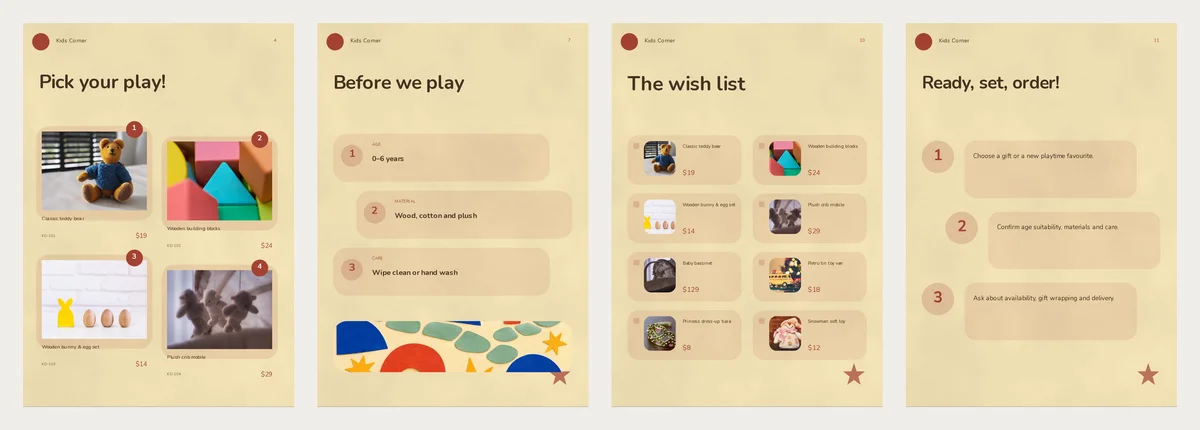
Play Parade feels warm, with cream pages and a teddy among wooden toys on the cover. Play Orbit feels bolder: a paper rocket, planets and round photo frames. Choose the one that looks like your shelves.
Look at the "Before we play" page in Play Parade. Play Orbit calls it "A grown-up's field guide". It has three boxes: age, material and care. The sample says "0–6 years" for the whole range. That is rarely true for a whole shop. A tiara with small stones is not a baby toy. Write the real age range, or split the page by age.
Keep the wish list page. It shows all eight toys small, with names and prices. A child can point, and a parent can send you the names.
A gift for a new baby
A baby gift buyer reads the small print. They are often buying for a child they hardly know. Soft Cloud and Mint Garden suit them, with six calm pages each. Soft Cloud is lilac with a crib mobile on the cover. Mint Garden has a white photo over a red block, then pale green pages.
Page 5 gives one toy a page of its own: a big photo, the price and a small table under it. That table is sample text. It shows the same words whatever toy lands there, so rewrite it for your toy.
A list for the counter
Pick Toy Box when you want everything on one page. Every toy sits on one row: a thumbnail, its code, then its price. Eight rows fit with room to spare. Print it for the counter, or send it to a parent who already knows your shop.
Pick Picture Tiles when the photos sell the toy. It puts four big photos on each page, with the price in a purple tag. Eight toys fill two pages.
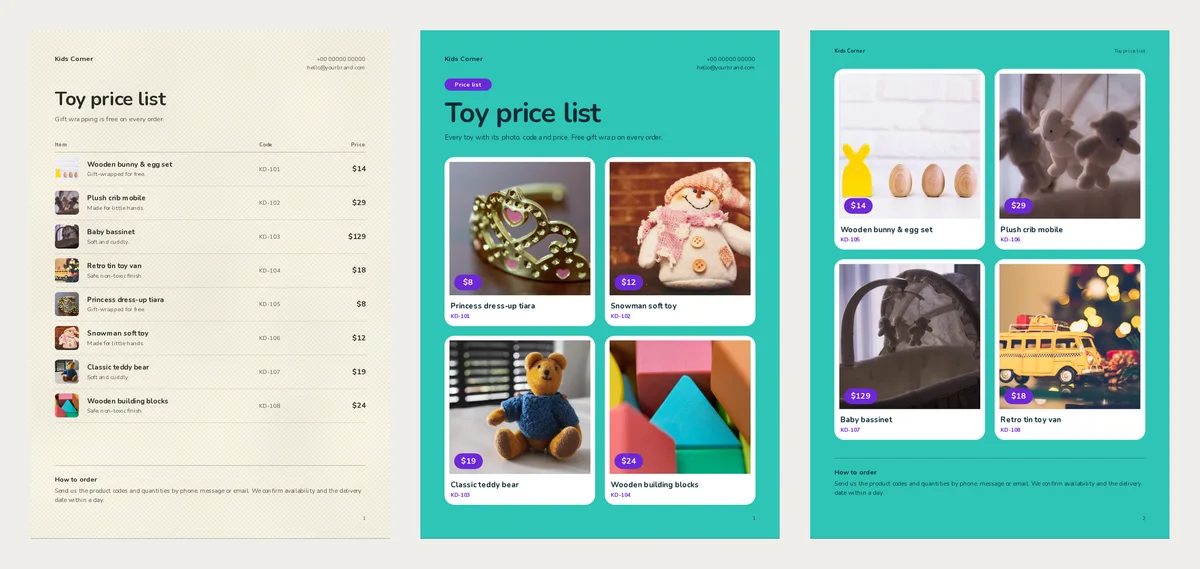
Both end with a "How to order" note. The sample promises to confirm stock and a delivery date "within a day". Change that if you cannot reply so fast.
One toy, one chat
Pick Birthday Bash. A flyer design makes one square page per toy, so eight toys gave us eight flyers. Each has a big yellow price circle. To send a single flyer, make it with that one toy only.
Selling to other shops
Pick Toy Trade, a landscape line sheet. A line sheet is a short list for shop buyers, with codes and trade prices. Page 1 holds your terms: minimum order, payment, lead time and what prices include.
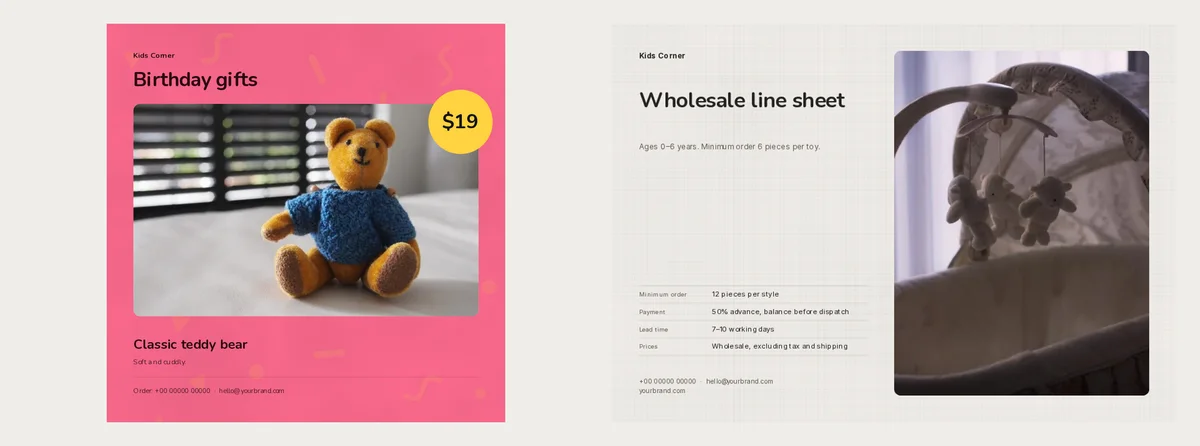
Check one thing before you send it. Under the title, the sample says "Minimum order 6 pieces per toy". The terms table below says "12 pieces per style". A buyer will ask which one is right. Make both say the same number.
Put the age and warning where buyers look
Write the age on every toy, as printed on its box. Add the size and whether it needs batteries. One short line is enough: "Ages 3+. 20 cm. Wood. No batteries."
If you sell in the US, there is a rule about warnings too. When a toy's box must carry a choking hazard warning, a catalogue that people order from must carry the same warning. This covers small parts, small balls, marbles and balloons. The CPSC final rule for catalogues explains it. It also allows one full warning at the top of a page, if every toy on that page needs it.
Copy the warning from the toy's own box, word for word. For one toy, put it in that toy's description. For a whole page, add a line at the top with Text and then Paragraph. The same rule says a catalogue sent only to other shops for resale does not need the warnings. A day care or school buying toys for children to use is not a reseller, so its copy still needs them. Selling in other countries? Check their own rules.
Make one with your own toys
Every design here is free to use, and the catalogues and lists are A4.
- Open a design, such as Play Parade, Soft Cloud, Picture Tiles, Birthday Bash or Toy Trade. Its Use with my photos button starts your copy.
- Drop in one photo per toy. Fill in the toy's name and price. The age line goes in the description box, and the code in Code. Phone users see those boxes after a tap on More details.
- Press Next: choose a design. Add the shop's name and a title. Create catalog builds it.
- Press Customize, then double-click each sample line about age, care or contact. Replace it with your words.
- For WhatsApp, open PDF, choose Compact and press Create PDF. Pick HD only for print.
More designs are on the toy catalogue templates and toy price list templates pages.
Before you send it, hold each toy's box next to its page and check that the ages match.