
The same product flyer design, before and after
A good product flyer design shows one product, one short price and one way to order. We made the same soap flyer twice, and five changes made the second one work.
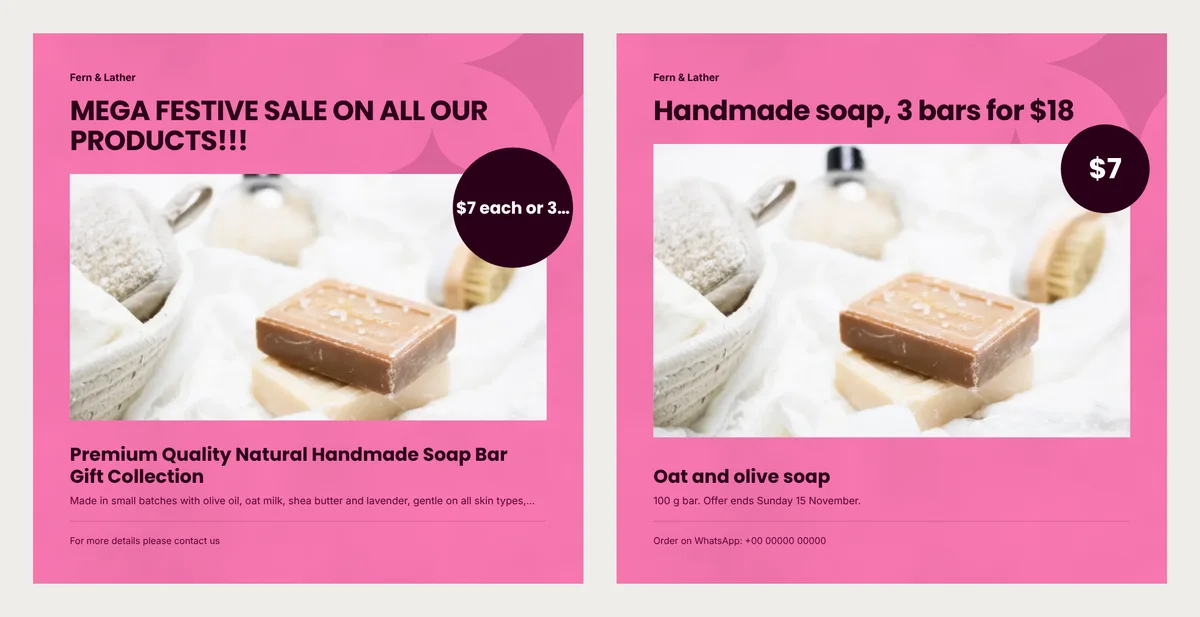
Look at the two flyers below. They sell the same soap, with the same photo and the same pink design. The left one is a typical first try. The right one tells a buyer what it costs and how to get it.
Fern & Lather is a sample soap shop. Its buyers are gift shoppers who see a flyer on WhatsApp and order for a friend. Below is the product flyer design we made for it, twice. For each change, we show why and what we measured in the finished flyers.
Why the first flyer failed
The owner typed everything they wanted to say. The facts were fine. The trouble was space.
This template has six text boxes: shop name, headline, product name, price, one line under the name and an order line. Each box has a set size. The headline may use two lines, and so may the product name. The line under the name gets only one. Anything longer is cut off with three dots.
Put one price in the circle
Before: "$7 each or 3 for $18". After: "$7".
The circle grows only a little for a long price. Then the text must shrink, and ours still did not fit. It came out as "$7 each or 3…", so the deal itself was lost.
We measured the price text in both circles. The long one was set about 40% smaller than the short one.
So the circle holds the price of one bar. The deal moves to the headline, where it has room.
Name the product and the deal in the headline
Before: "MEGA FESTIVE SALE ON ALL OUR PRODUCTS!!!" After: "Handmade soap, 3 bars for $18".
The first headline could sit on any flyer in any shop. It names no product and no price. Capital letters also take more room, so it spilled onto a second line.
The new headline answers two questions at once. What is it, and why buy now? Together with the $7 circle, a buyer sees both prices: one bar, or three for less.
Writing "Was $9, now $7"? Only do that if $9 was your real price for a good while. In the US, the FTC's guides on former prices call a made-up "was" price deceptive. Check the rules in your country too.
Give the product a short name
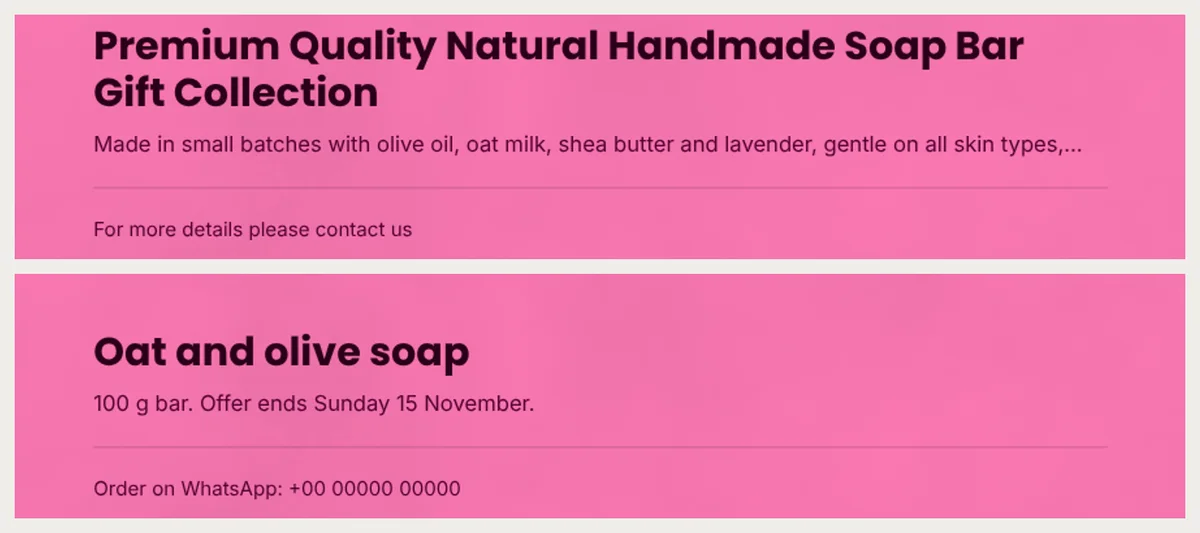
Before: "Premium Quality Natural Handmade Soap Bar Gift Collection". After: "Oat and olive soap".
Words like "premium" and "quality" tell a buyer nothing they can check. A name with what it is made of tells them more in fewer words.
Short words also free space. The long headline and the long name each took two lines. Every extra line pushes the bottom of the photo up. On the first flyer, the photo filled 45% of the page height. On the second, it filled 53%. That is the same photo, about a fifth taller. Most of that room came from the shorter headline.
Keep the line under the name to one fact and a date
Before: a list of oils, butters and skin types, cut off after "skin types,…". After: "100 g bar. Offer ends Sunday 15 November."
Pick the fact a buyer needs most. For soap, that is the size. For a cake, it is how many it serves. Ingredients and allergy notes still matter. Send them in your reply when someone asks, or print them on the back.
Then add an end date. An offer with no end date is easy to put off. A date also helps when someone asks for the deal a month later.
Tell people exactly how to order
Before: "For more details please contact us". After: "Order on WhatsApp: +00 00000 00000".
"Contact us" asks the buyer to find your number somewhere else. Most will not bother. Write the one way you want orders, with the number in full.
On a PDF, you can also make the number open a chat. Our guide on adding a WhatsApp link to a PDF shows how.
The two flyers in numbers
Picture each flyer filling a phone screen 6.5 cm wide. Here is how big the type comes out, and how much space each part takes.
| Part of the flyer | Before | After |
|---|---|---|
| Price in the circle | 2 mm type, cut off | 3.3 mm type, whole |
| Headline | 2 lines | 1 line |
| Product name | 2 lines | 1 line |
| Line under the name | cut off | whole |
| Order line | no number | 1.1 mm type, with the number |
| Photo height | 45% of the page | 53% of the page |
Not one change needed a new design. Each fix just used fewer words.
Build it from the Glow Sale flyer
We used the free Glow Sale flyer. It suits soap, skincare and small gifts. For other products, the flyer templates page has more square and A4 designs. A sale on many products? Make one flyer for each, since every product gets its own page.
- Click Use with my photos and add one photo.
- Type a short name. In the price box, type only the number, like 7.
- Your one fact and date go in the description box. Phone users find that box under More details.
- Press Next: choose a design. The Title box becomes your headline, so put the product and the deal there.
- Add the shop's name. Under Prices, pick $ Dollar to add the sign. Then press Create catalog, which makes your flyer.
- Click Customize (the pencil) and double-click the order line at the bottom. Type how people should order.
- Click PDF, choose Compact and press Create PDF. Send that file on WhatsApp.
Last, read the price circle out loud. Two breaths means it is still too long.