
Price list design ideas that still read on a phone
Pick the layout by how buyers read it. A table with codes suits orders by message, photo tiles suit WhatsApp, and big receipt-style prices were the only ones we measured above Apple's 11 pt minimum on a phone.
The best price list design is the one your buyer can read where they read it. For orders by message, use a table with codes. For WhatsApp, use photos. For a phone screen, use big prices.
That last point surprised us. We built one free price list in six layouts, and only one set its prices big enough for a phone.
One list, six layouts
Wick & Willow is our sample gift shop. It sells candles, vases, a jug, a basket, bath and body products, pouches and two lamps. We typed its 12 items once: a name, a code, a price and one short line each. Then we put the list into six ready-made price list designs.
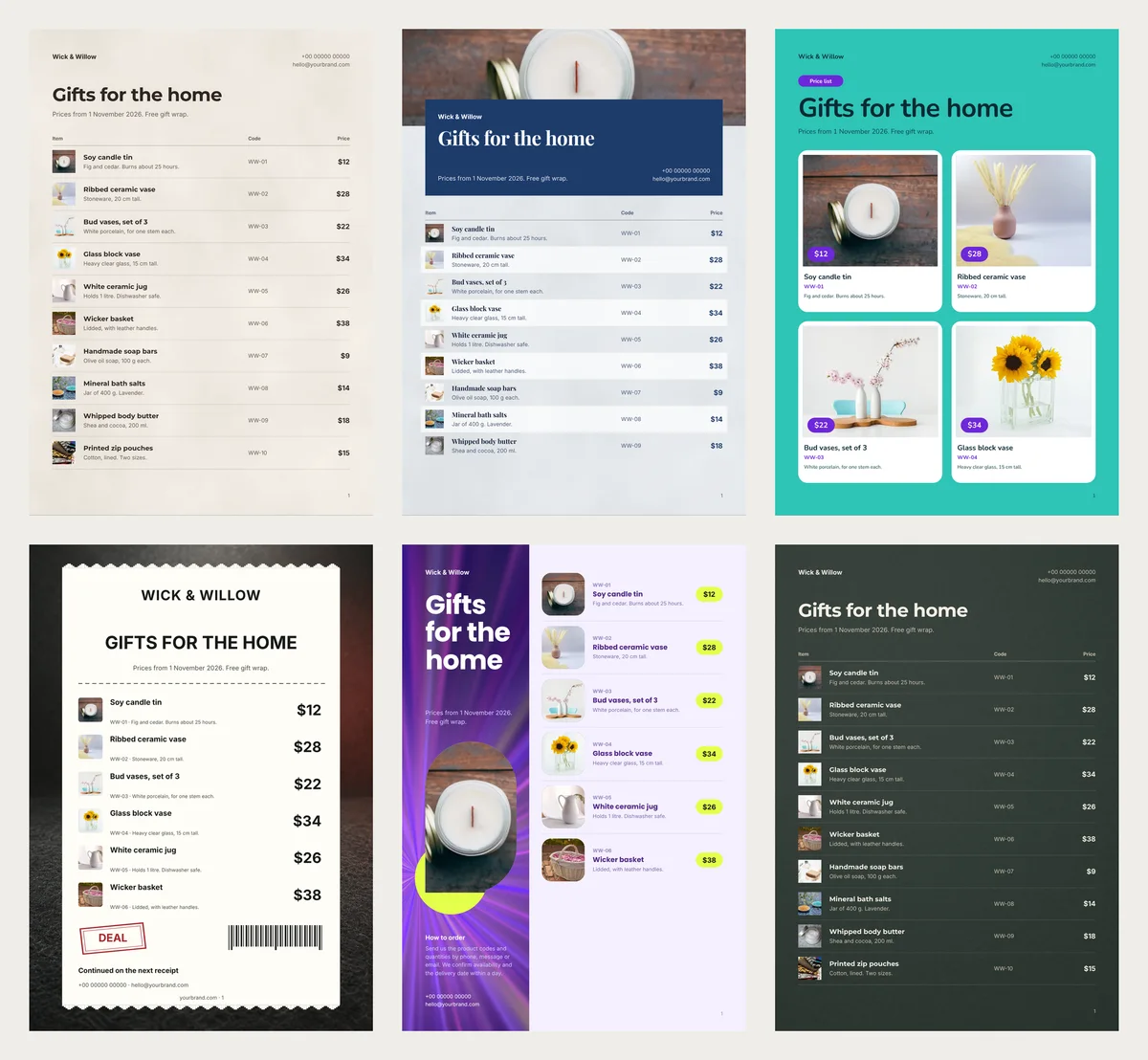
| Design | Items on a full page | Pages for 12 items | Compact PDF | Price on a phone | Photo on a phone |
|---|---|---|---|---|---|
| Candle Bar (table) | 10 | 2 | 148 KB | 8 pt | 4 mm |
| Blue Hour (photo on top) | 9 | 2 | 191 KB | 8 pt | 3 mm |
| Picture Tiles | 4 | 3 | 297 KB | 8 pt | 24 mm |
| Doorbuster Receipt | 6 | 2 | 225 KB | 16 pt | 4 mm |
| Ultraviolet (side panel) | 6 | 2 | 221 KB | 8 pt | 7 mm |
| Café Board (dark) | 10 | 2 | 162 KB | 8 pt | 4 mm |
For the phone columns, we pictured each A4 page filling about 6 cm of a phone screen. The price sizes are in points, the unit iPhone apps use. Apple's typography guide recommends at least 11 pt for text in iPhone apps.
Compact is the app's small PDF for WhatsApp and email. Every one stayed under 300 KB.
A plain table with a code on every row
Rows of photo, name, code and price fit the most items on a page: ten of ours on one A4 sheet. The code does the work here. A buyer types "WW-07 x 3" in a chat, and you know it means three soaps.
Sell one candle in three scents? Give each scent its own row and code. Then nobody has to ask which one they will get. The Candle Bar design is a warm paper table like this.
A wide photo above the list
Blue Hour puts one photo across the top of page 1, under a navy title card. The banner used our first item's photo, the candle, so put your best-looking product first. The photo takes room: one page held 9 rows.
Photo tiles with the price on the picture
In Picture Tiles, each item gets a big tile with a violet price pill on the photo. Our photos came out 24 mm wide on the phone, six times the size of a table photo.
The cost is pages. Four items fit on a page, so our 12 needed three, and the Compact PDF doubled. Choose tiles when the look sells the item, like gifts before Christmas.
Big prices on a receipt
Doorbuster Receipt looks like a long shop receipt. Each price is set twice as big as in the table. On the phone, ours came out at 16 pt, the only one above Apple's 11 pt minimum.
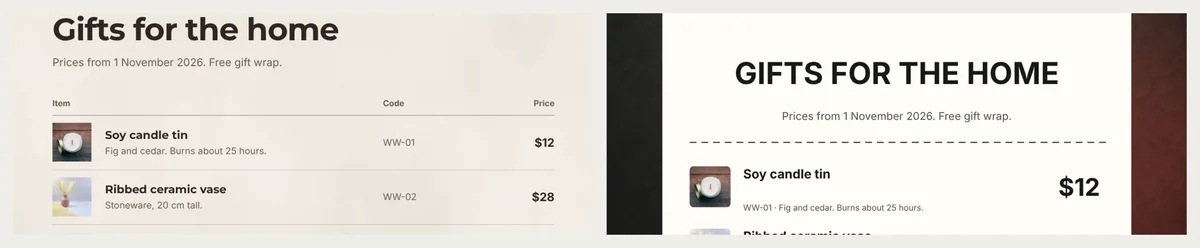
It comes with "Black Friday" above the title, but works all year: we deleted those words. It is one design for any shop; see its Doorbuster Receipt page.
One large photo on a coloured side panel
Ultraviolet has a violet strip down the left, with the title and one tall photo of your first item. The rest sit on the right, six to a page, with prices in lemon pills. Its HD file for print was 951 KB, four times the Compact one.
A dark board for the counter
Café Board is light text on dark green, like a chalkboard, with ten rows on a page. Show it on a tablet at the till, or print one copy for a frame. For sheets you hand out, a light design saves a lot of printer ink.
Your own line under the title
The setup asks for your business name and a title, but not the line under the title. So that line keeps the template's sample words. Ours read "Coffee, bakes and breakfast" in Café Board and "Every toy with its photo" in Picture Tiles.
Double-click it on the page, or edit it in the Text box beside the page. A date is a good choice: "Prices from 1 November 2026. Free gift wrap." Nobody then orders from last season's list.
End on a full page
Twelve items in the table left a second page with just the two lamps on it. A nearly empty page looks unfinished.
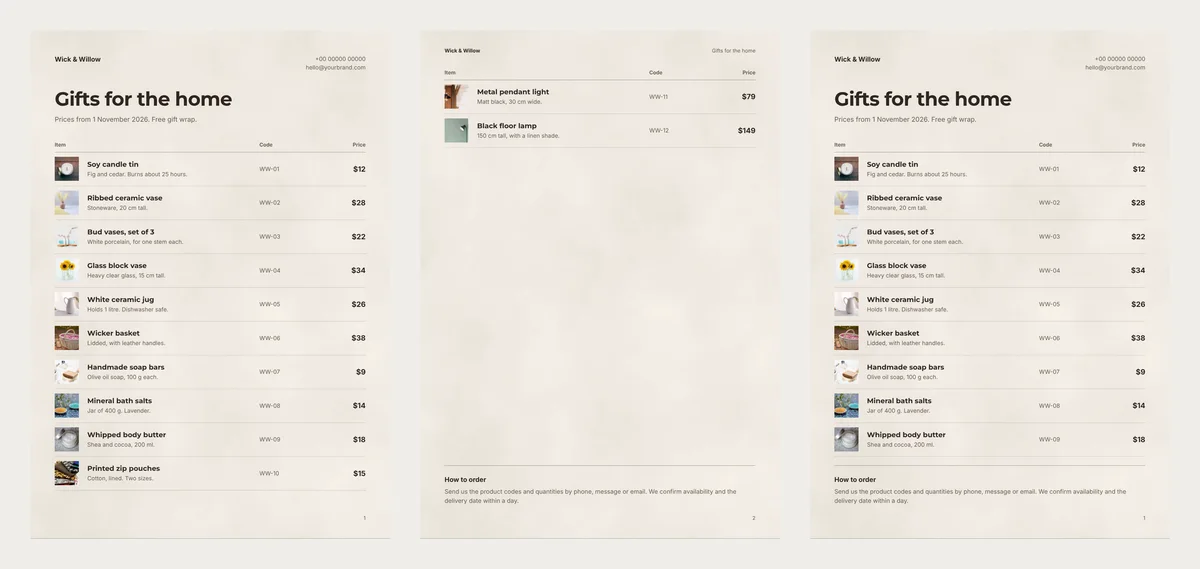
Ten items fill a table page. But at ten, the "How to order" note at the end sat on top of the tenth row. With nine, everything fit. The lamps could go on a list of their own.
Build it from Candle Bar
Every design above is on the price list templates page. Open one, such as Candle Bar, and click Use with my photos. Drop in your photos. Under each one, type the name, price, code and one short line.
Click Next: choose a design. Fill in Your business name and a Title. The preview shows how many pages you will get, and you can try another design before you click Create catalog.
In the editor, double-click the "How to order" note to write your own. Then click PDF and pick Compact for WhatsApp, or HD for print.
Before you send it, look at the last page. If it holds only one or two items, move them or add a few more.