
How to write a product description for a catalogue
Put the fact a buyer checks first, like size or pack count, and keep it short. At 6 products a page, about 130 characters fit before the text is cut.
A common mistake is to paste the text from your website. It was written for a page with lots of room. Under a small catalogue photo, it gets cut off, and the useful part is usually at the end.
A good product description in a catalogue is one or two short lines. It answers the question a buyer would otherwise send you. Everything below works in any catalogue, and you can try it free in CatalogLeaf.
Inkwell Lane, a made-up stationery shop, sells notebooks, pens and paper to offices and schools nearby. They get its catalogue on WhatsApp and reply to order. Before they ask the price, they ask "How many sheets?" or "What size?" We made its catalogue page twice: once with website text, once with short lines.
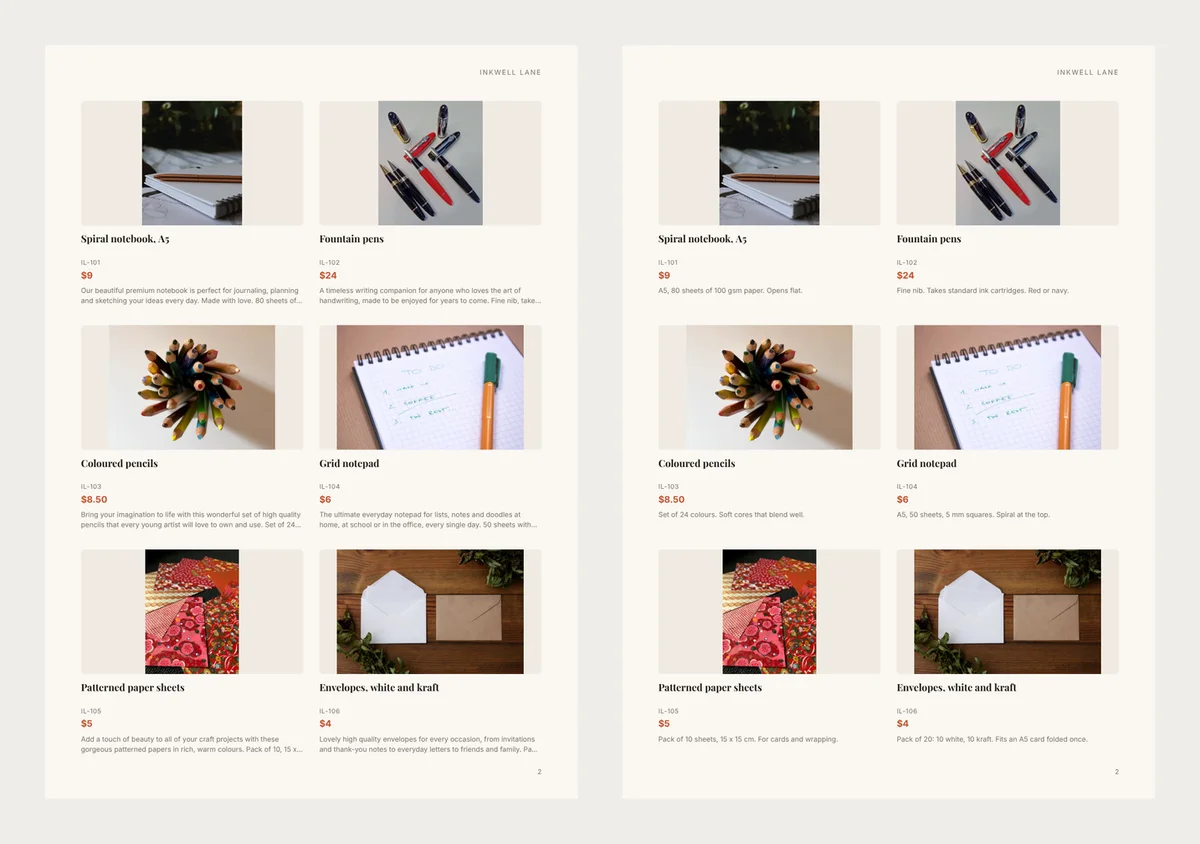
The fact a buyer checks first
For a notebook, buyers check size and paper. For envelopes, they check how many come in a pack and what fits inside.
Here is the notebook line from the website:
Our beautiful premium notebook is perfect for journaling, planning and sketching your ideas every day. Made with love. 80 sheets of 100 gsm paper.
On the page, it stopped at "80 sheets of…". The paper weight never showed. These are the new lines for all six products:
- Spiral notebook: "A5, 80 sheets of 100 gsm paper. Opens flat."
- Fountain pens: "Fine nib. Takes standard ink cartridges. Red or navy."
- Coloured pencils: "Set of 24 colours. Soft cores that blend well."
- Grid notepad: "A5, 50 sheets, 5 mm squares. Spiral at the top."
- Patterned paper: "Pack of 10 sheets, 15 x 15 cm. For cards and wrapping."
- Envelopes: "Pack of 20: 10 white, 10 kraft. Fits an A5 card folded once."
"gsm" means grams per square metre. A higher number is thicker paper. If your buyers may not know a word like that, add a hint, such as "thick paper".
How much text fits
We filled the Simple design with longer and longer descriptions, on A4 pages. Then we checked where the app cut the text and added "…". US Letter pages gave the same results, except at 1 per page.
| Products on each page | Lines for the description | Characters that fit (about) |
|---|---|---|
| 1 per page | 7 or more | 700 or more |
| 2 per page | 6 | 310 |
| 4 per page | 3 | 170 |
| 6 per page | 2 | 130 |
| 9 per page | 1 | 45 |
Short words fit a few more characters, long words a few less. So write to the smaller number. At 9 per page, one fact is all you get: "Set of 24 colours."
Long text can cost you pages
Many of CatalogLeaf's ready-made designs with a product grid work the other way. They don't cut long text. Each card grows to fit it, so the photos change size and fewer products fit on a page.
We tried it with eight Inkwell Lane products in a grid of three across. With one short line each, all eight fit on one page. With the website text, the same eight needed two pages.
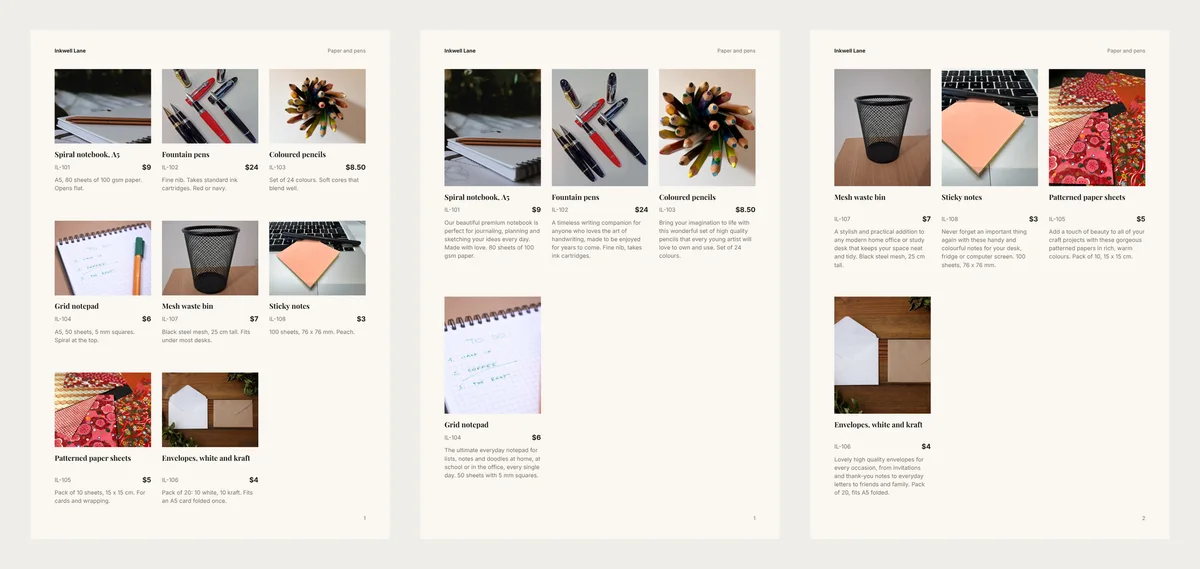
Bigger photos can help, so this is not always bad. But choose it on purpose, not because a sentence ran long.
Size, colour and material in their own boxes
A description is free text. Facts like size or colour are easier to scan on their own line, in the same place on every card.
In CatalogLeaf, click Add a detail under a product. On a phone, tap More details first. Pick Size, Colour or Material, or type your own, like "Pack". The page then prints one line, such as "Size A5 · Colour Navy".
On the Choose a design screen, Show on pages lets you switch a detail off for one catalogue. It stays saved with the product.
One shared fact, said once
This works for a page or a section of one kind of product. If every notebook in it is A5, put "A5 notebooks" in the heading. Then each line has room for what is different, like the paper or the cover.
Delivery, gift wrap and how to order belong on the last page, not under each photo.
Proof instead of praise
Words like "premium" and "beautiful" take space and prove nothing. Replace each one with the fact behind it.
- "High quality envelopes" becomes "Pack of 20: 10 white, 10 kraft."
- "A stylish bin for your desk" becomes "Black steel mesh, 25 cm tall."
If you can't find a fact behind a word, cut the word.
Only true claims
Write "Handmade" or "Made in…" only when you can show it. A catalogue is an advert, and adverts have rules. In the US, the FTC's Made in USA guide says the rule covers catalogues and online pages too.
Write them in CatalogLeaf
Open the free catalogue maker and add your products. Under each one, the box says "A sentence or two about it (optional)". Type your short line there. With 50 products, start with your ten best sellers.
Then click Next: choose a design. In Simple, pick Products on each page and keep the table above in mind.
Before you share, look at the preview at the number per page you chose. If a line ends in "…", cut words from the front, where the praise usually sits.