
Halloween catalogue designs for nine kinds of shop
Pick the Halloween catalogue design made for what you sell, put your best seller first, and cut repeated pages for WhatsApp. Five to eight products fill 12 pages.
We put eight products into each Halloween design in CatalogLeaf. Every one made a 12-page catalogue. The first product showed up on five to seven of those pages.
A Halloween catalogue only has a few days to work. So the order of your products and the length of the file matter more than usual.
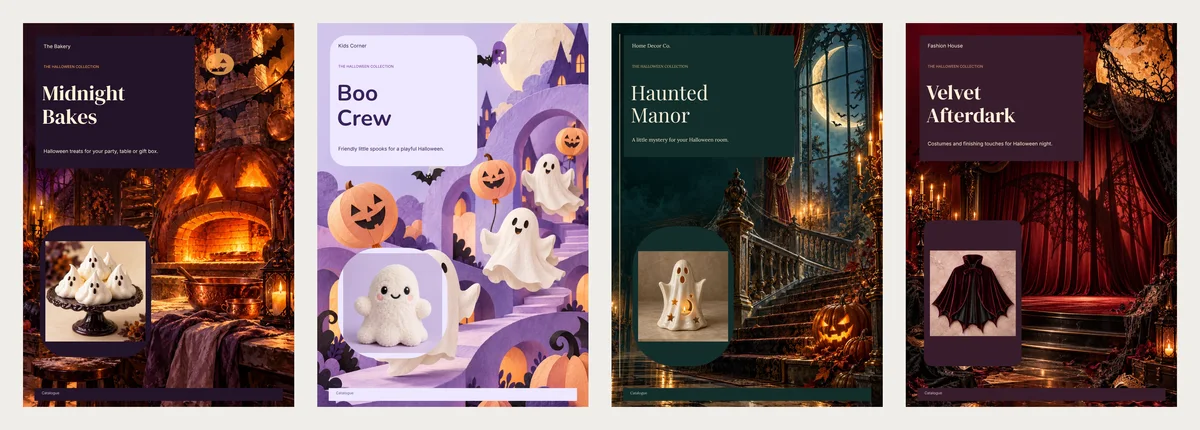
Match the design to what you sell
Each design was drawn for one kind of shop. Its pictures and notes fit that shop. So start with what you sell, not the colour you like.
- Midnight Bakes (bakery): ghost meringues on a dark counter, warm oven light. The notes ask about portions and ingredients.
- Boo Crew (toys and baby gifts): soft lilac, friendly ghosts, no scary faces. Good when parents are the buyers.
- Haunted Manor (home decor): candlelit windows and cobwebs in deep green. Its notes ask buyers to check the size first.
- Velvet Afterdark (costumes and accessories): red curtains and a theatre feel. Buyers are asked to measure and check fit.
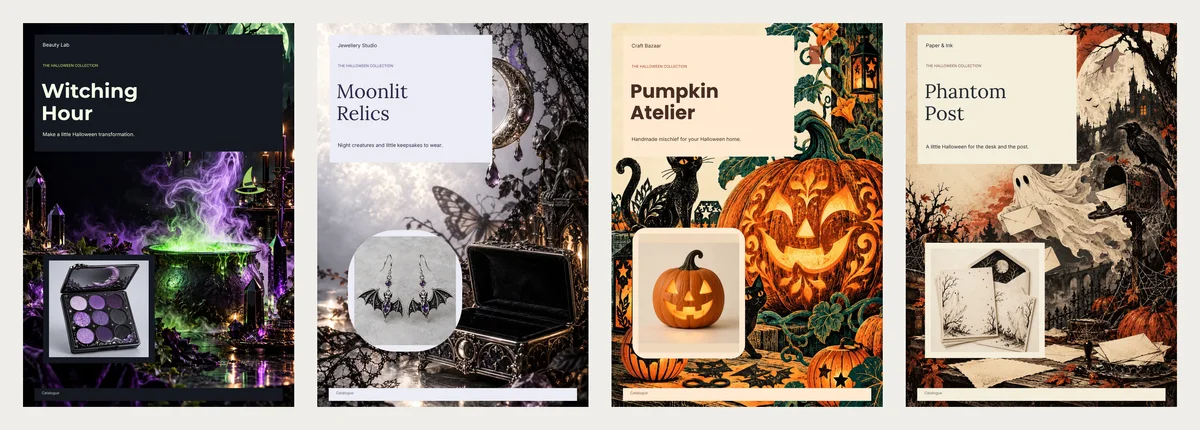
- Witching Hour (make-up and beauty): a black shelf with bright green. Shades and glitter pop against it.
- Moonlit Relics (jewellery): pale moonlight with soft purple details. Small pieces stay easy to see.
- Pumpkin Atelier (handmade decorations and gifts): a warm craft bench in orange and cream.
- Phantom Post (cards, gift tags and stationery): pale parchment, so small print stays easy to read.
- Ghostlight Supper (plates, cups and tableware): a wide brochure with ghostly place settings. It comes with a music-box tune, which you can keep, change or remove.
Sell party treats and costumes together? Pick the design for your best seller. You can change any background later.
All nine sit on one page: Halloween catalogue templates.
Put your best seller first
Your first product goes on the cover. It then appears on most pages. With eight products, the first one showed on five to seven of the 12 pages. Some later products showed on only two or three.
So choose the first product with care. It should be the thing most people will buy, with your clearest photo. A bakery might lead with a box of cookies, not one fancy cake.
When you add your photos, each product gets a number. Use the up arrow next to a product to move it to number 1.
How many pages your range makes
We built each design with 1, 3, 5, 8, 12 and 20 products. All nine designs gave the same page count:
| Your products | Pages |
|---|---|
| 1 | 9 |
| 3, 5 or 8 | 12 |
| 12 | 14 |
| 20 | 17 |
With three to eight products, you always get 12 pages. The design fills them by showing your products more than once: a grid, a large single photo, a page of two and a list.
That is fine for a printed counter copy. On a phone, 12 pages of the same eight things feels long.
Cut it down for a quick send
Halloween falls on a Saturday this year, 31 October 2026. If you are sending in the last few days, a short catalogue is better.
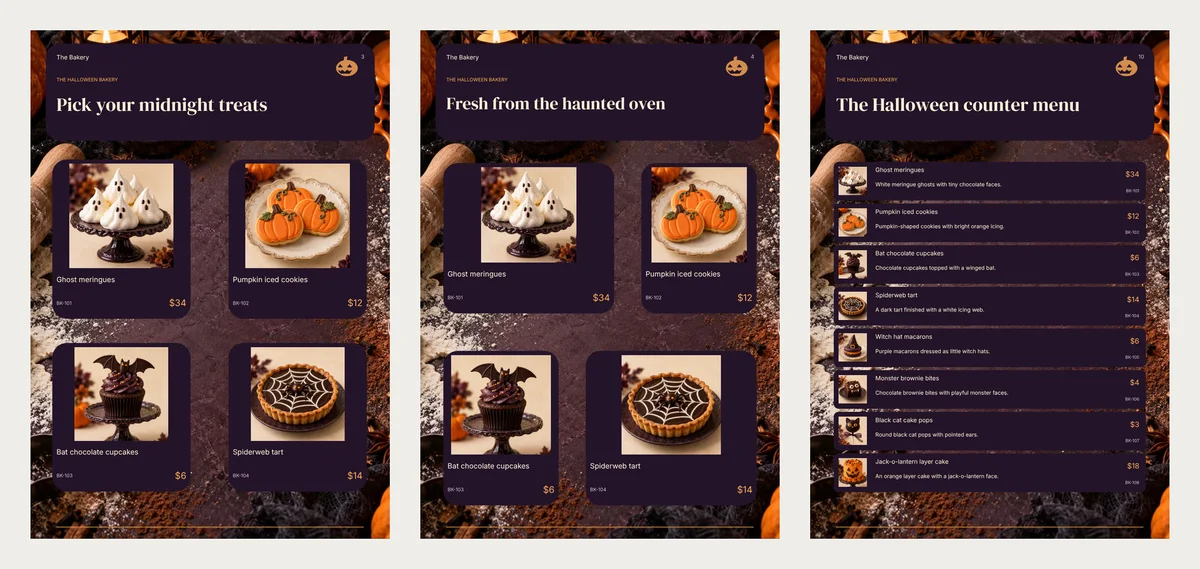
Look for pages that repeat. In Midnight Bakes, pages 3 and 4 show the same four bakes. Keep one of them. Keep the cover, one grid, the list with prices and the last page with your phone number. That leaves 5 or 6 pages. A customer reads them in one go.
To remove a page, find it in the pages list on the left. Click its bin icon (Delete page) and confirm.
Write the order notes for your shop
Every design has small note boxes with sample questions. Most shops forget to change them.
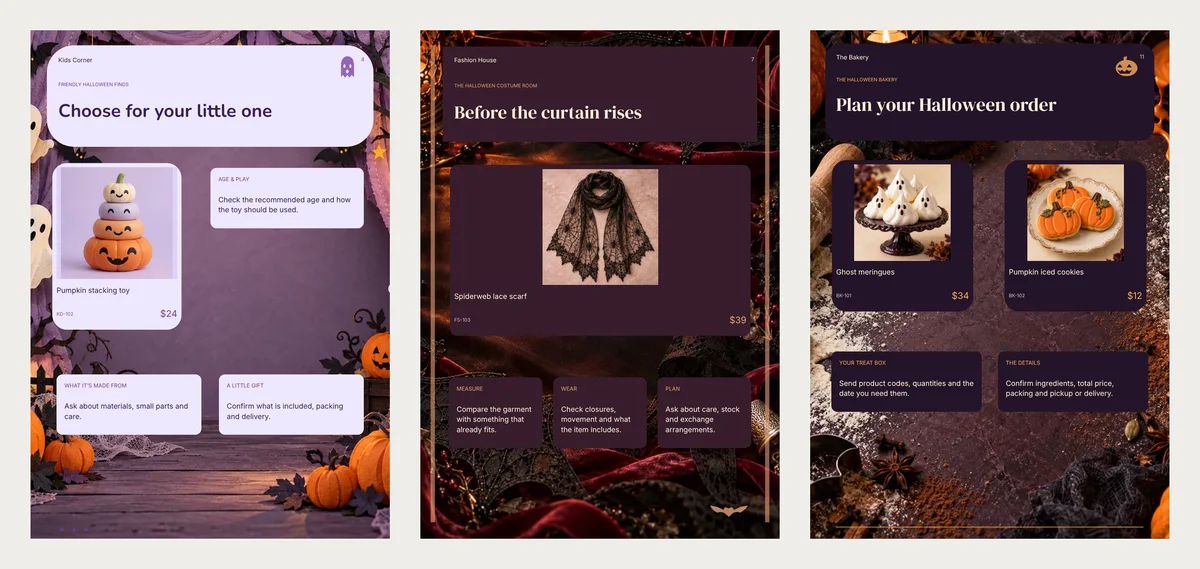
Change the sample text to your real rules:
- Bakery: the last day to order, collection times, and which bakes contain allergens such as nuts, gluten, milk or egg.
- Toys: the age each toy is for, and whether it has small parts.
- Costumes: sizes in inches or centimetres, and your exchange rule. If a costume's label says "flame resistant", say so. In the US, the Consumer Product Safety Commission says costumes sold in shops must be flame resistant. Elsewhere, check your own country's rules.
- Decor and crafts: the size, and whether it comes packed as a gift.
In the editor, put your last order date in the cover subtitle too, such as "Order by Thursday". It tells people to act now.
Make it and send it
Open the design you chose and click Use with my photos. Add a photo, name and price for each product. Then click Next: choose a design and Create catalog.
In the editor, delete the repeated pages and rewrite the notes. Click PDF and choose Compact, the small file for WhatsApp, or HD for a printed counter copy. Or click Share to send a link. On a phone, people swipe through the pages.
Send it first to the customers who bought from you last October. They are the likeliest to order again.