
What happens when you add music to a flipbook
One song plays behind every page and carries on as pages turn. It starts after a tap where the browser asks for one, readers can switch it off, and it can fade away on the last page.
"Love the music. What's the song?" That is the reply you hope for when you add music to a flipbook. The other one, "How do I turn it off?", has an easy answer too.
Below are the questions owners ask most. We checked each answer in CatalogLeaf and timed the music on a live link, the one you can play near the end.
Can you add music to a flipbook?
Yes. In CatalogLeaf, the Music button sits at the top of the editor, and it's free. Made your flipbook with another tool? Upload its PDF and add the music here.
The song lives on the link, not in the file. A PDF downloaded from the same flipbook is silent.
How do I put music in my flipbook?
Click Music for a short list of tracks, and click one to choose it. More options opens the full window. There you pick a track and click Use this music. The Volume slider starts at 60%.
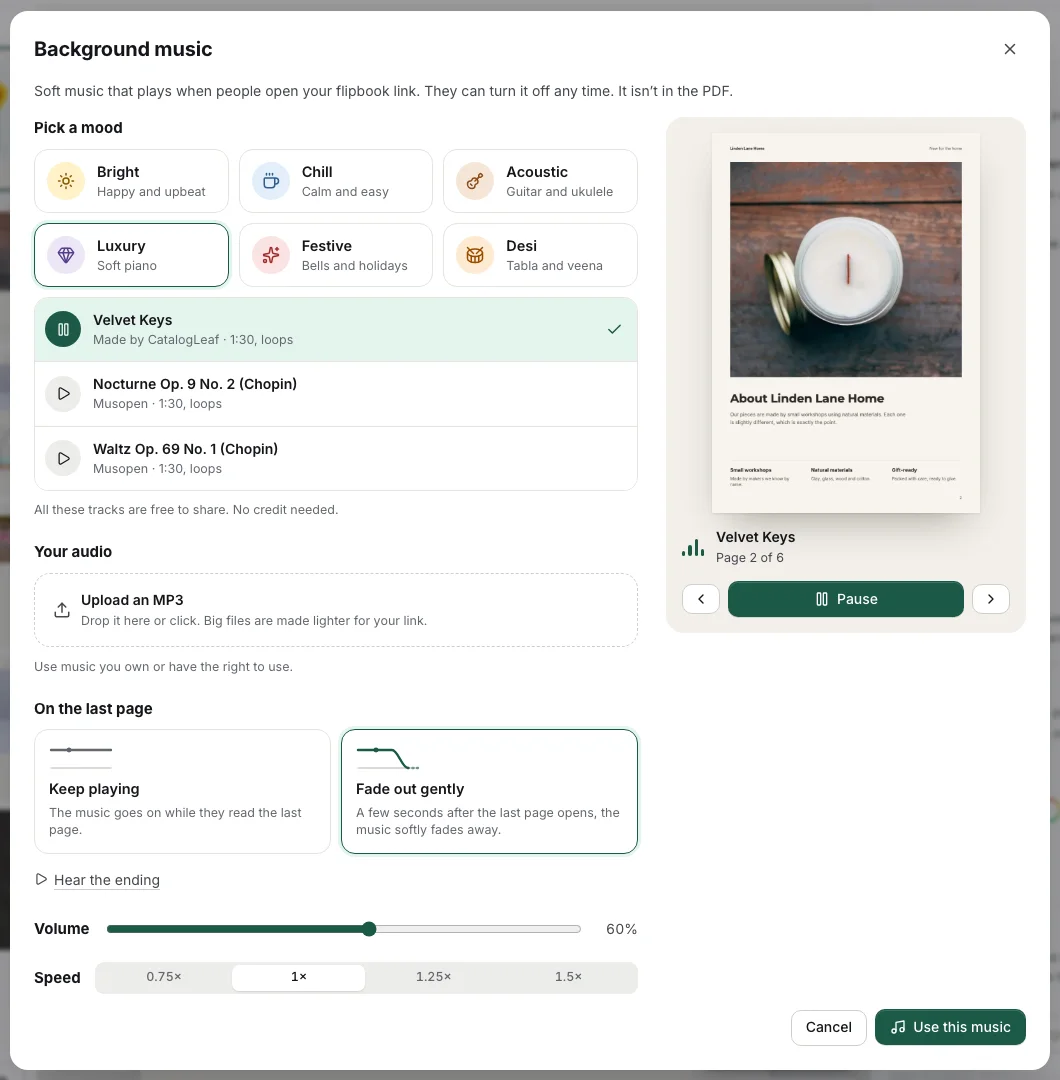
Before you share, click Play with my pages. Your own pages turn by themselves while the song plays, as a customer will see them. A step-by-step version with screenshots is in how to add music to a PDF.
Where can I get free music for a flipbook?
From the Music window itself. It has tunes made by CatalogLeaf and free tracks by other musicians. The window says they are free to share, with no credit needed.
| Mood | Sounds like | Tracks include | Good for |
|---|---|---|---|
| Bright | Happy and upbeat | Sunny Shelf, Sweet Sun | Sales, toys, gifts |
| Chill | Calm and easy | Slow Sunday, Chills | Home decor, candles |
| Acoustic | Guitar and ukulele | Porch Strings, LaDaDa Guitar | Handmade goods |
| Luxury | Soft piano | Velvet Keys, two Chopin pieces | Jewellery, beauty |
| Festive | Bells and holidays | Lantern Bells, Le Divin Enfant | Christmas gift lists |
| Desi | Tabla and veena | Bazaar Morning, Indian Tabla Tune | Diwali, weddings, sweets |
Can I upload my own music?
As an MP3, yes: click Upload an MP3. Only use a song you own or have the right to use. A hit from the radio belongs to someone else.
In Chrome, Edge or Safari, a file over 4 MB is made smaller for the link and cut to its first 3 minutes.
Does the music restart on every page?
No. We watched the song's clock on our link while turning pages, and it never went back to zero. When a track ends, it starts again from the top without a jump.
Can each page have its own song?
No, a flipbook has one song from the cover to the back page.
Why doesn't the music start on its own?
Phones and browsers stop sites from making sudden noise. Safari on iPhones has long asked for a tap before media plays, and Chrome has similar rules.
So the link shows Tap for sound until the reader taps the page. Where a browser allows sound at once, the song starts by itself.
Can readers turn the music off?
Any time, with the speaker button under the page. One tap turns it off, another turns it back on.
The music also goes quiet while one of your videos plays on a page. It pauses when the reader switches tabs, or leaves the browser on a phone.
Can the music stop at the end of the flipbook?
Yes. Under On the last page, Keep playing lets the song go on. Fade out gently gives it about 4 more seconds, then fades it out over 3.
We timed it twice on our link. The song stopped 7.6 and 7.9 seconds after the last page appeared. The extra moment is the page turn itself. When we turned back a page, the song came back from where it stopped.
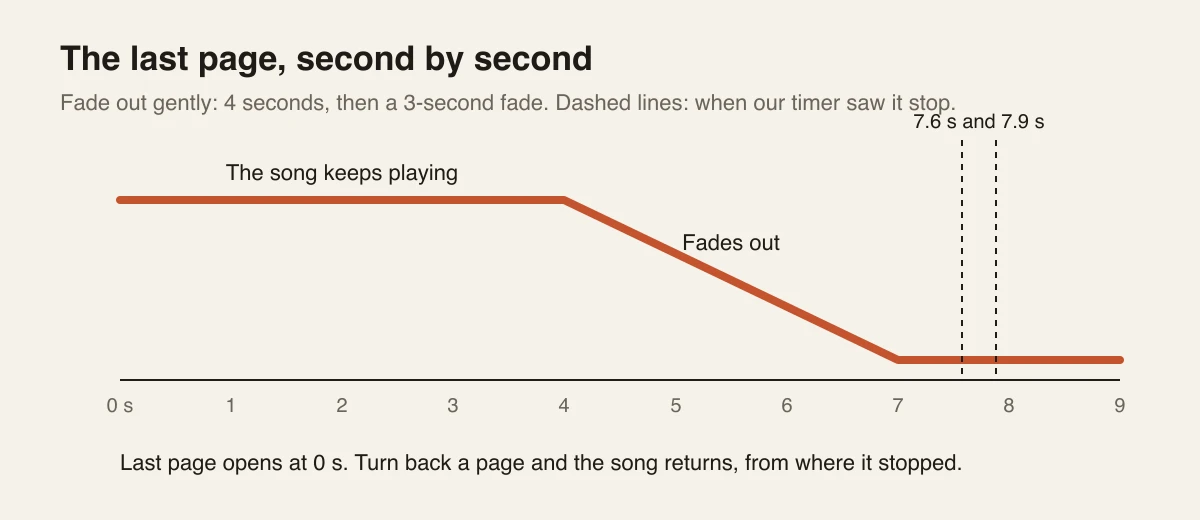
Here is our link. Tap the cover, then go to the back page.
How do I change the music after sharing the link?
Click Music and pick another track, or click No music to remove it. Then open Share and click Update link. Your customers keep the link they already have.
Then open your own link, go straight to the back page and count to eight.