
A New Year menu design guests can book from
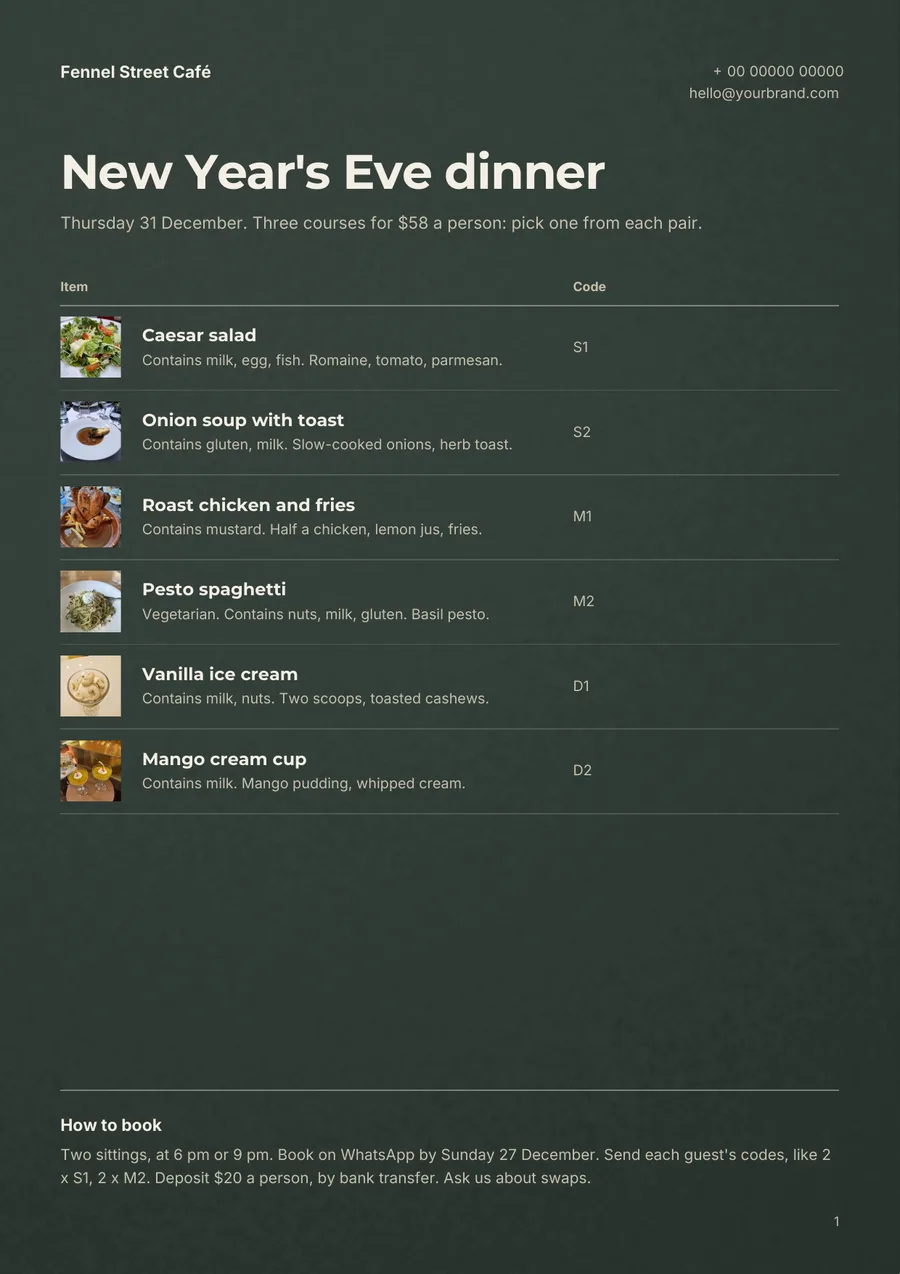
A good New Year menu design fits on one page, shows one set price, gives each dish a code guests can book with and puts allergens at the start of each line.
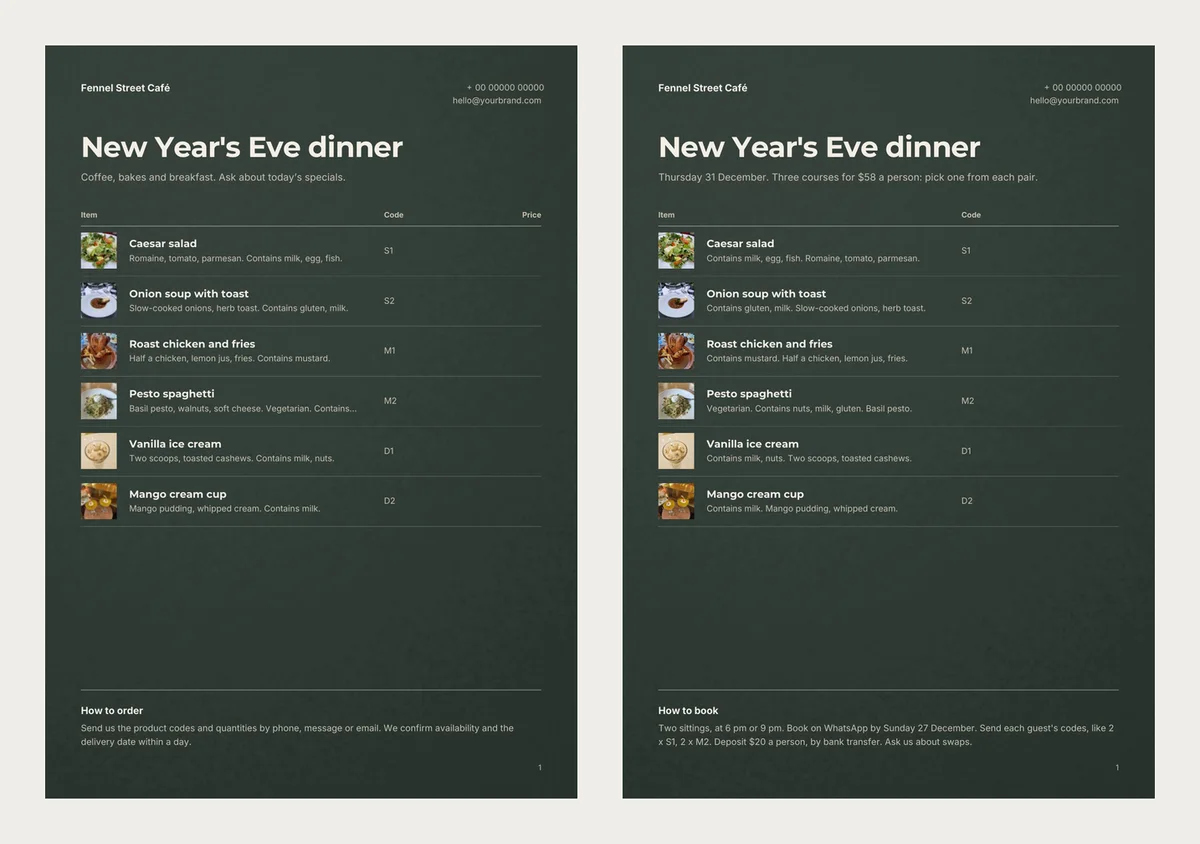
Our first try at a New Year's Eve menu looked finished. It had six dishes, photos and a dark, festive background. But it still promised "Coffee, bakes and breakfast", and one dish had lost its nut warning.
This post builds one New Year menu design from start to finish, for a café we made up. We used a free template in CatalogLeaf. You can follow the same choices in any menu maker.
The café and its one big night
Fennel Street Café has 24 seats and usually serves breakfast and lunch. On Thursday 31 December it opens for one dinner, at a set price.
Guests choose one starter, one main and one dessert. There are two of each, so the kitchen preps only six dishes.
One A4 page on a dark background
We picked Café Board, a dark green menu with light text. It looks like a night out, not a breakfast menu. The page is A4, so any copy shop can print it.
Six dishes took up the top half of the page. We left the rest empty. A short menu is easier to read in a dim room than a full one.
A set price instead of six prices
The template has a Price column. A set dinner needs just one price, so we left every dish price blank.
That left a "Price" heading over an empty column. It looked like we forgot something. We double-clicked the heading and deleted it.
The price went into the line under the title instead: "Thursday 31 December. Three courses for $58 a person: pick one from each pair." Guests see the date and price before any dish.
A code for each dish
Each dish has a short code: S1 and S2 for starters, M1 and M2 for mains, D1 and D2 for desserts.
We first gave each dish a category, like "Starters". Café Board did not print categories. The letter in each code now shows the course instead.
Codes pay off when guests book. A table of four can send "2 x M1, 2 x M2". Add up the codes on 28 December and you know what to buy.
Here is a sum, with sample numbers. Both sittings are full, so 48 guests. If 30 choose the roast chicken, at half a chicken each, you need 15 chickens.
Allergens at the start of each line
Under each dish is one short line. On our first try, the pesto line was 61 characters: "Basil pesto, walnuts, soft cheese. Vegetarian. Contains nuts." The page cut it after "Contains". The word "nuts" never showed. Our shorter lines, up to 54 characters, showed in full.
So we turned every line around. The allergens come first, then the dish: "Vegetarian. Contains nuts, milk, gluten. Basil pesto." If space runs out, the cut now falls on the least important words.
In the UK, for example, cafés must give allergen information for 14 allergens. Milk, eggs, nuts and gluten are among them. The Food Standards Agency guidance says a written menu is one way to do it. Check your own country's rules too. Our only vegetarian main has nuts and gluten, so the booking note asks about swaps.
Sample words that stayed behind
Our dishes replaced the template's dishes, but not its other words. The line under the title still read "Coffee, bakes and breakfast". The bottom note promised a "delivery date within a day", which suits a bakery, not a dinner.
The phone number and email at the top are placeholders in our pictures. Put your real ones there.
A booking note that answers the questions
We renamed the note "How to book" and wrote:
Two sittings, at 6 pm or 9 pm. Book on WhatsApp by Sunday 27 December. Send each guest's codes, like 2 x S1, 2 x M2. Deposit $20 a person, by bank transfer. Ask us about swaps.
Two sittings mean 24 seats can serve 48 guests. The booking date leaves three days to shop and prepare. A deposit means fewer empty seats if plans change. With all 48 seats booked, that is $960 held before the night.
The whole menu took one page. Its Compact PDF was 145 KB, small enough for WhatsApp.
Build it in five steps
- Open the Café Board template. Press Use with my photos, then add one photo for every dish.
- Under each photo, type the dish name and leave the price empty. The code goes in Code (optional), and the allergen line in the box under it. Phone screens show these boxes after you tap More details.
- Press Next: choose a design. Type the café name under Your business name and the menu name under Title. Press Create catalog.
- Press Customize (a pencil on a phone) to open the editor. Double-click the line under the title, the Price heading or the bottom note to rewrite it.
- Press PDF. Pick Compact for a WhatsApp message or HD for the copy shop, and press Create PDF.
For more menu looks, see the menu card templates.
Before you send it, read each allergen line to its last word. That is where our nut warning went missing.