
Stationery catalogue design: 10 looks for school and office
A good stationery catalogue design puts a code and the pack facts under every item, so schools and offices can order by message. Choose the design by who orders, then check that every code still prints.
"30 × LS-104, 5 × LS-101, 2 boxes of LS-103." That is a good order from a school office. Nobody asked you which pad, what size or how many sheets.
A stationery catalogue design gets you orders like that when every item shows a code and its pack facts. A teacher can then order straight from the page. A pretty cover matters less.
We took ten of CatalogLeaf's free stationery designs and filled each with the same eight products. Then we checked what printed and what went missing.
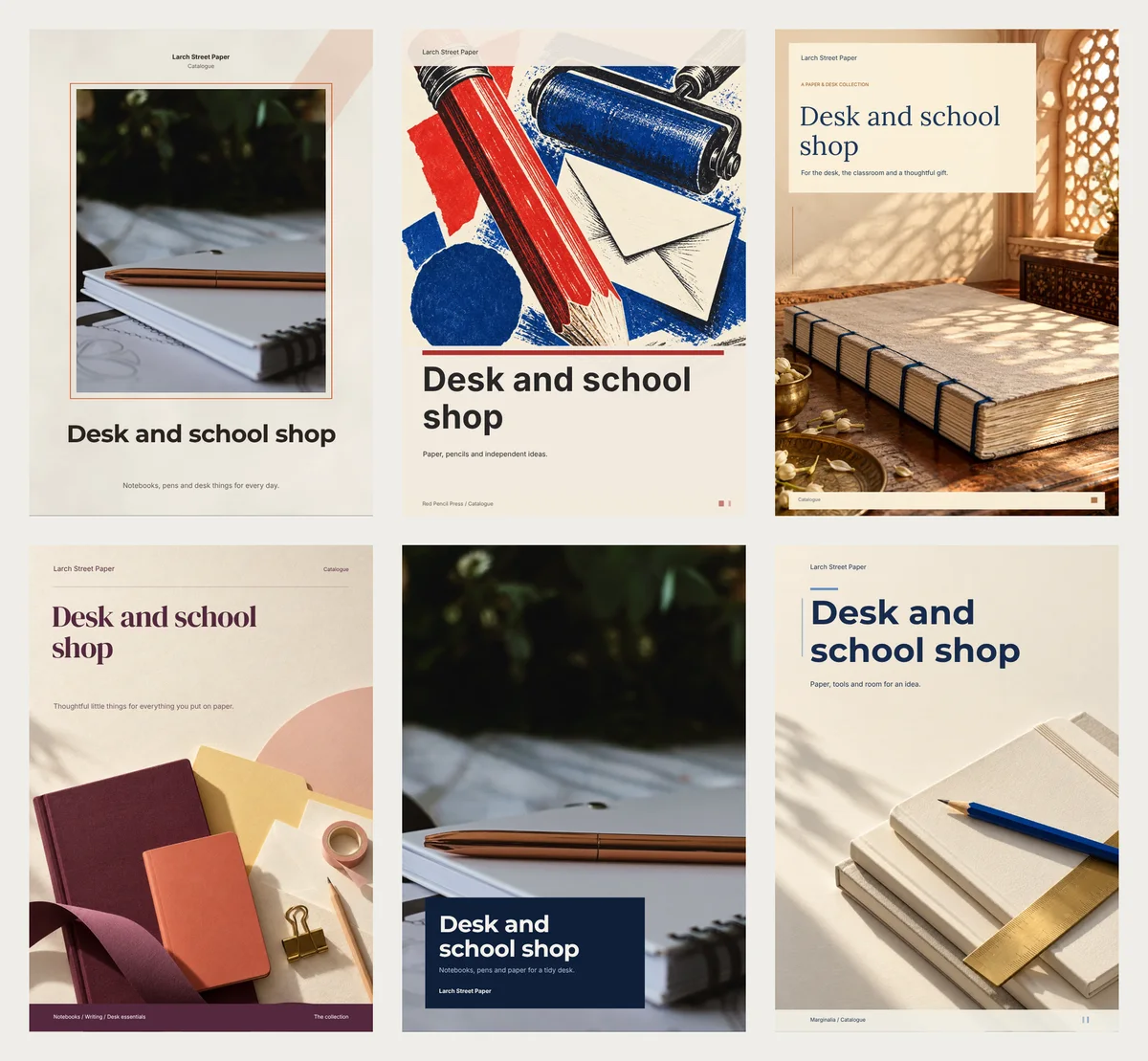
One code and one line per item
Larch Street Paper is our made-up shop. It sells an A5 notebook, a pen set, coloured pencils, a grid notepad, a pen cup, sticky notes, origami paper and a writing set. Each got a code, from LS-101 to LS-108, and one line of facts:
A6 · 5 mm grid · 60 tear-off sheets
For paper, give the size, the ruling and the sheet count. A pen line can be as short as "Set of 4 · 0.5 mm tip". If you sell one pen in three ink colours, give each colour its own code. Selling cheaper by the box? Put it in the line: "$4, or $35 for 10".
Selling coloured pencils, crayons or paints in the US? Look on the box for a line like "Conforms to ASTM D-4236". The US Consumer Product Safety Commission requires one of these statements on art materials. If your supplier printed it, add it to the line.
Pick a stationery catalogue design by who orders
"Codes shown" counts how many of the eight codes print anywhere in the file. For size, we saved each one at Compact, the lightest of the three PDF qualities.
| Design | What it makes | Pages | Codes shown | Compact PDF |
|---|---|---|---|---|
| Lilac Notes | Price list | 1 | 8 of 8 | 188 KB |
| Office Supply | Line sheet | 2 | 8 of 8 | 208 KB |
| Paper Trail | Catalogue | 6 | 8 of 8 | 439 KB |
| Paper Atelier | Catalogue | 7 | 4 of 8 | 370 KB |
| Paper & Purpose | Catalogue | 12 | 8 of 8 | 585 KB |
| Marginalia | Catalogue | 14 | 8 of 8 | 566 KB |
| Red Pencil Press | Catalogue | 14 | 8 of 8 | 646 KB |
| Midnight Ink | Lookbook | 6 | 5 of 8 | 620 KB |
| Highlighter | Brochure | 9 | 5 of 8 | 451 KB |
| Back to School | Flyer | 8 flyers | 0 of 8 | 661 KB |
Four designs drop some or all codes. Check those before you send one to a school.
Schools and offices ordering in bulk
Lilac Notes fits all eight items on one A4 page, with a Code column next to the price. It was the smallest file we made.
Office Supply is a line sheet. That is a short price list for shops and offices that buy in bulk. Page 1 holds your terms. Page 2 shows every item in a grid, with its code, price and line.
A bigger range works too. We also tried 40 items. Lilac Notes ran to 4 pages and Office Supply to 6, and every code still printed. Both Compact files stayed under 225 KB.
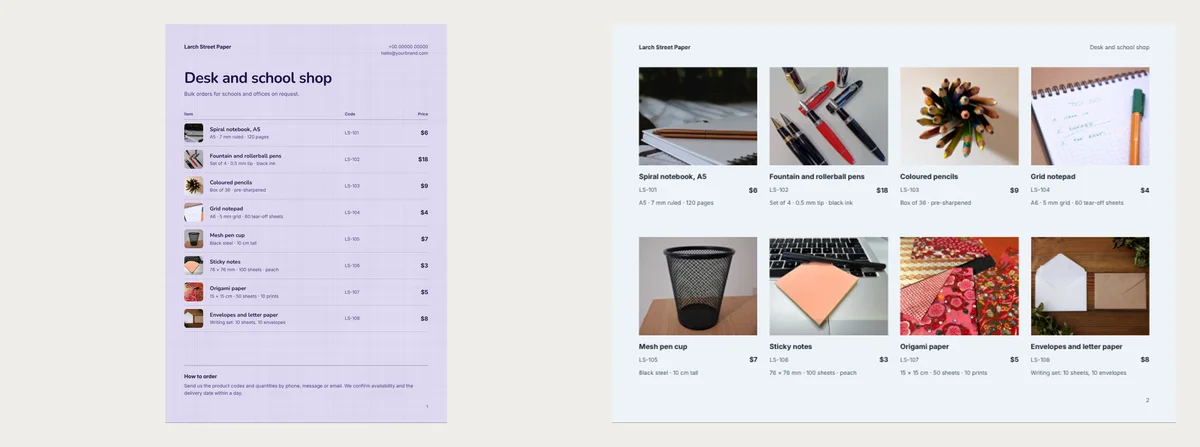
The sample terms say "12 pieces per style", "50% advance, balance before dispatch" and "7–10 working days". "Per style" suits clothes, not pens. Write a minimum that fits your stock, like "10 packs per item".
A short catalogue for WhatsApp
Paper Trail made six pages, with your first photo on the cover, so put your clearest one first. Every item showed its code and line.
Paper Atelier has its own art of plum notebooks on the cover. You need no cover photo. It is the warmer, gift-shop look. But only four codes printed. The last four items sit on a page called "The full list", with names and prices but no codes.
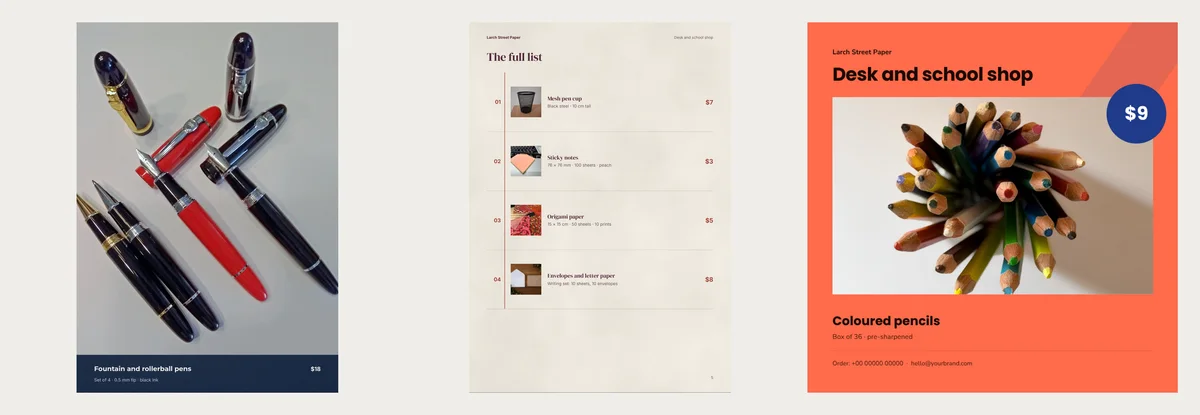
If you use it, double-click that list and type each code after the name. Or put the four items people reorder most at the front.
A longer book for the counter
Red Pencil Press, Marginalia and Paper & Purpose made 12 to 14 pages from eight items. Each item showed up two to four times, in grids, lists and pages of its own.
Red Pencil Press has bold red and blue print-room art. Marginalia is cream and navy, with a brass ruler on the cover. Paper & Purpose has a hand-bound ledger and "PAPER / DESK / SMALL GIFTS" at the top of most pages. Change that line if you sell no gifts.
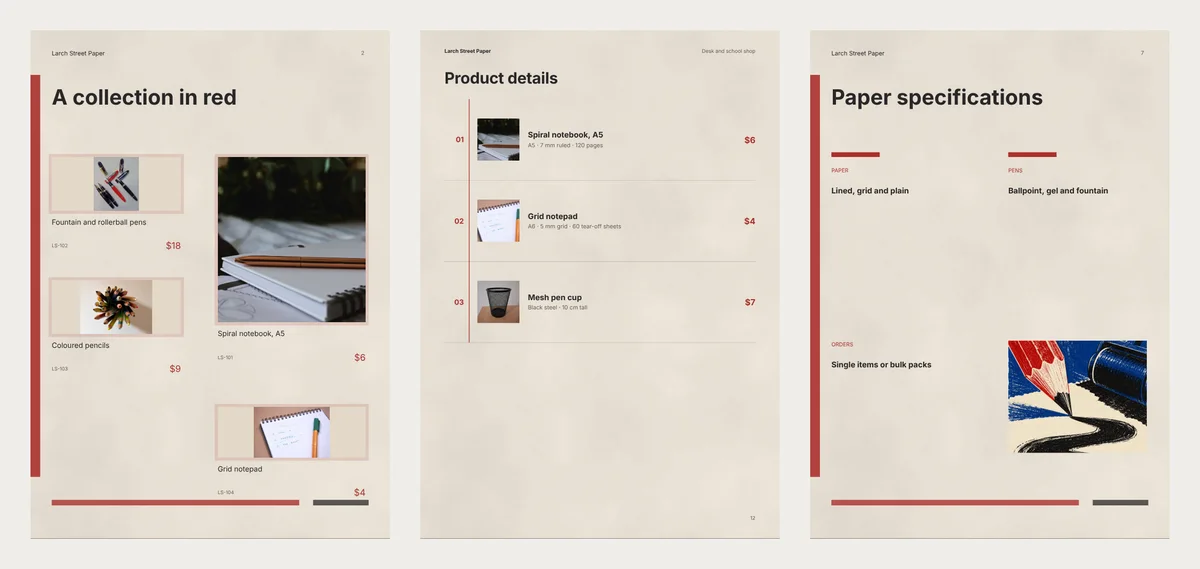
In Red Pencil Press and Marginalia, a grid page holds four items with a code and a price, but no pack line. That line turns up just once per item, on its own page or in "Product details".
Red Pencil Press also has a "Paper specifications" page. Marginalia has the same page, called "Paper particulars". Both still say "Ballpoint, gel and fountain" with your products. Our shop sells no gel pens, so that line was wrong. Edit it, or delete the page.
Fourteen pages suit a printed copy by the till. For WhatsApp, delete a few repeated pages. Then check every code still shows somewhere, since the stock list has none.
Gifts, flyers and a hand-out
Midnight Ink is a dark blue lookbook with big photos. The pens, pencils and notepad each got a full page with no code. That suits gift buyers who ask by name, before Christmas or Teachers' Day.
Back to School makes one square flyer per item, with a big round price badge. Eight items gave eight flyers. Send just one, for the item you most want to move at the start of term.
Highlighter is a landscape brochure in olive and bright yellow, nine pages long. Print it for the front desk of an office you supply. Its last three items sit on a list page without codes, so type them in.
Sample lines to rewrite
These sample lines stay with your products:
- The About text in Paper Trail, Paper Atelier, Red Pencil Press, Marginalia and Highlighter. It says you "can gift wrap any order". Paper Trail and Highlighter add "Free gift wrap" in a box of its own.
- The line under your title, such as "Paper, pencils and independent ideas."
- The "How to order" note on Lilac Notes, which promises to confirm "within a day".
- The sample contact rows near the end: a placeholder number, email and street.
Make it in CatalogLeaf
- Open Lilac Notes, Office Supply, Paper Trail or Red Pencil Press. Then press Use with my photos.
- Add a photo of each item, then its name and price. The code goes in Code (optional), and the pack line in the description box. Phone screens hide both boxes until you tap More details.
- Go on with Next: choose a design. Type the shop name under Your business name, add a Title and press Create catalog.
- Double-click any sample line to rewrite it. Then click PDF and choose Compact for WhatsApp, or HD for print.
Before you send the PDF, search it for your last code. If it is not there, a buyer can't order that item by message.