
Happy New Year status video with your name
Pick a design, type your wish for 2027 and your name, and download a New Year status video made for WhatsApp Status, Instagram Stories and Reels. Free, no sign-up.


6 New Year status videos to make yours
Tap one to open it with your words. Every one is free to download.
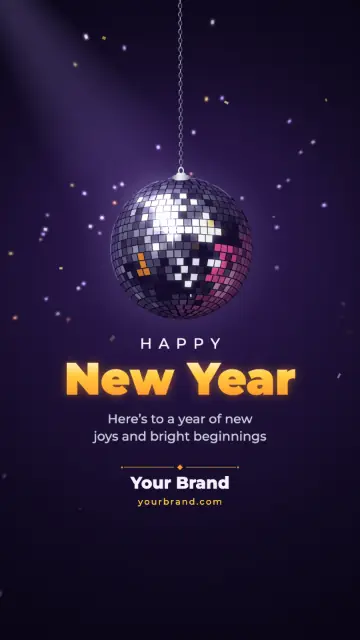
- Midnight Mirror BallA mirror ball lowers into a violet night and turns, throwing flecks of light across the wall as foil confetti rains down.
- Champagne Family FireworksYour group photo across the top, fading into a black and champagne night where gold and silver willow fireworks fall in glittering trails.
- Navy Starlight StreamersGold and silver foil stars and curled streamers drop in on threads over a navy night and turn, catching the light.
 Silver Sparkler ScriptA silver sparkler writes your New Year greeting in light on midnight black, then fizzes beside it over far city lights.
 Midnight Family GlowYour photo beside a midnight sky of glass bulbs, swinging foil stars and soft far fireworks.
 Gold Party PoppersTwo gold party poppers burst open: curled foil streamers fly up and hang swaying while confetti settles on the table.
See every New Year design with your name
Type your name or your company’s, add your logo or a family photo, and every design on this page shows it. Pick one and it opens with everything filled in. What you add stays in this browser.
How it works
Pick a design
A turning mirror ball, a sparkler that writes your words, gold foil stars, gold party poppers, or two made around your family photo. It plays at once with sample words.
Type your wish and name
Replace the sample words with your own wish and your name, or your business name. Add a logo or a photo if you like.
Download and post it
Download the MP4 and post it as your WhatsApp Status, or share it as a link.
A status that says it is from you
The New Year videos passed around at midnight look the same on everyone’s status. This one carries your own wish and your name, or your business name and logo, so the people who see it know who it is from.
The fireworks, the lights and the movement are part of each design and stay as they are, so it looks finished with whatever you type. Long names shrink to fit instead of running off the edge.
How to post it as your WhatsApp Status
Download it
Tap Download: the MP4 saves to your phone or computer. No sign-up.
Open WhatsApp
Go to Updates and add a status.
Pick the video
Choose it from your gallery or files and send it. A status stays up for 24 hours, so posted on the evening of the 31st it is still there on New Year’s Day.
Made to fit a status
Shape
Vertical 9:16 at 1080 × 1920, the shape of a status, a Story and a Reel.
Length
15, 18 or 20 seconds: pick one before you download. The scene keeps playing the whole time.
Sound
Silent, so it reads well with the sound off. Add a song in the app you post from, if you like.
Questions
Can I download a New Year status video for free?
Yes. Pick a design, type your wish and your name, and download the MP4 without signing up.
Do I have to put my name on it?
Every design starts with sample words, so type your own wish and your name before you download: that is what makes it yours.
Can I write the year?
Yes. The headline and the wish are your own words: type the year, a greeting in your language, or both.
Can I share it without downloading?
Yes. Share a link instead, and the video plays on its own page.