Catalogue printing price: what you are paying for
A catalogue printing price depends on pages, copies, page size, paper, colour and binding. Send the print shop the same exact list every time, and the quotes you get back can be compared side by side.
The owner of Halden Home, our made-up decor shop, wants 100 catalogues. They hand them out at the till with each sale, and post some to local interior designers. Their first file has 22 products. The print shop's first question is not about price. It is "How many pages?"
No website can give you one catalogue printing price, because the price is built from answers like that. Below are the questions people type into Google about it. Each answer uses the free catalogue we built and measured for Halden Home.
How much does it cost to print a catalogue?
A price you see online is for someone else's pages, paper and number of copies. So it tells you little about yours.
The only number worth comparing is a quote for your exact catalogue. Ask a few printers, and send each the same list (it is below). Then compare the price for each copy, not the total.
What makes a catalogue printing price go up?
Pages count most. Each extra sheet costs paper, ink and press time for every copy.
After pages come these:
- Size. A4 and US Letter are standard sizes. An odd size often means extra cutting and wasted paper.
- Paper. A thick cover, or glossy paper inside, costs more than plain paper.
- Colour. Full colour costs more than black only. For a catalogue of products, pay for colour.
- Binding. Two staples in the fold (printers call it saddle stitch) is the cheapest way to hold a catalogue together. A glued spine, like a paperback, costs more and needs more pages.
Why is each copy cheaper when I print more?
Every print job has a fixed start. Someone checks your file, sets up the machine and trims the first sheets. You pay for that once, whether you print 20 copies or 500.
On a big press (offset printing), that start costs a lot, so it pays off only for hundreds of copies. Digital printing has a small start, so it suits a short run of a few dozen copies. Ask the printer which one they would use for your number.
Why does the printer ask for 8, 12 or 16 pages?
A stapled catalogue is made of sheets folded in half. One A3 sheet folded in the middle gives four A4 pages. So the page count must be a multiple of 4.
We tested this with Halden Home's 22 products in the free Terracotta design. CatalogLeaf made 10 pages: a cover, an About page, six pages of products, one page for a single product and a contact page. The last product page held only two items.
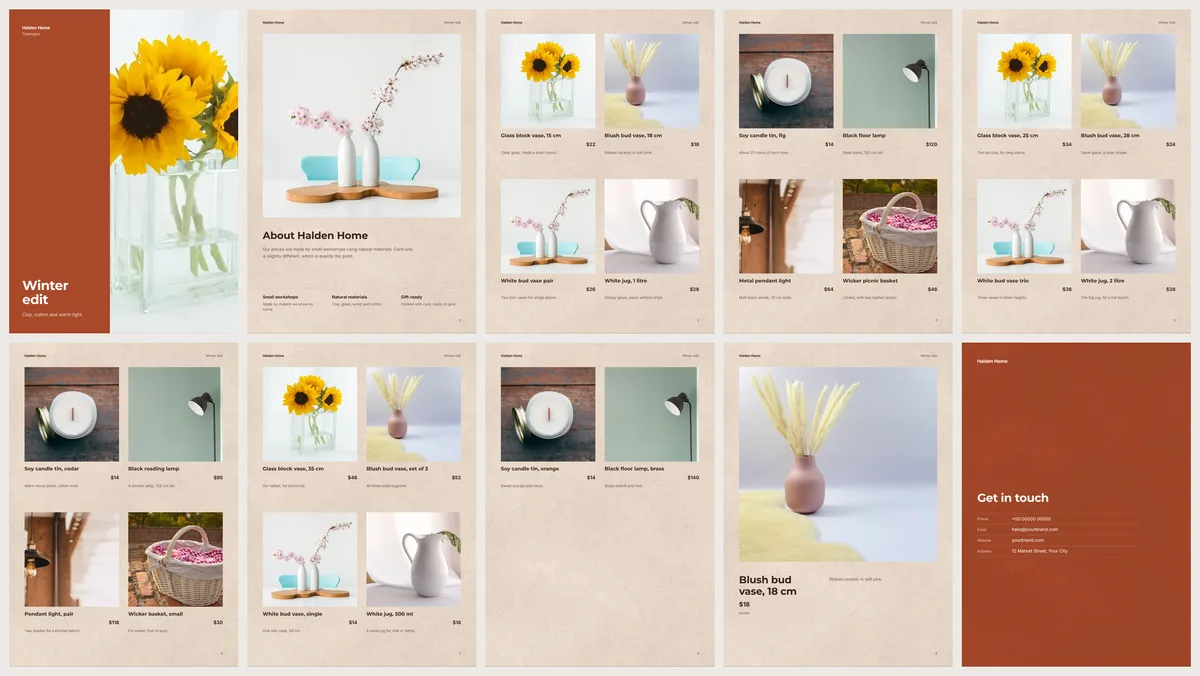
Ten is not a multiple of 4. The printer would add two blank pages and charge for them. You have two better choices:
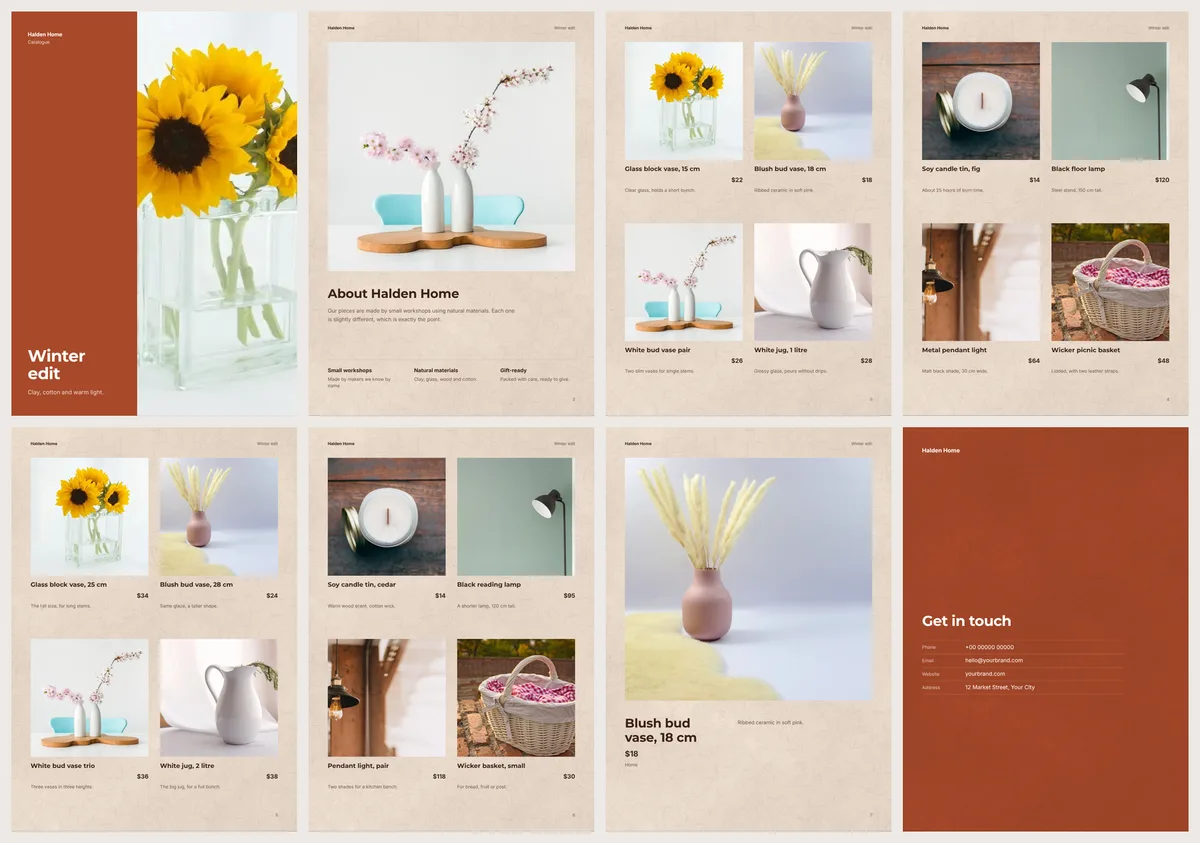
- Go down to 8 pages. We cut the list to 16 best sellers. The catalogue became exactly 8 pages, with every product page full.
- Go up to 12 pages. You need about 30 products for that. In the same design, 24 products still made only 10 pages.
Halden Home went down to 8. Their 16 best sellers include the $18 blush bud vase and the $120 black floor lamp. For 100 copies, 8 pages use 200 folded sheets and 12 pages use 300. So the 12-page book needs half as much paper again. Our guide on how many pages a catalogue should have shows how to plan the count before you start.
Is a brochure cheaper to print than a catalogue?
Yes, for the same number of copies. A folded brochure is one sheet, so there is nothing to staple or collate (put in page order).
The catch is space. A sheet folded twice has six panels, enough for a few best sellers and your contact details. If you sell 16 vases, lamps and baskets, that will not fit. Print the catalogue, and use the brochure as a hand-out.
What should I send to get a printing quote?
Send every printer the same short list, in writing. Here is the one we wrote for Halden Home:
- 8 pages, including the cover
- A4 portrait, 210 × 297 mm
- 100 copies
- Full colour on both sides
- Stapled in the fold
- A thicker paper for the cover than for the inside pages
- A PDF ready to print, no design work needed
- Collected from the shop by 1 December
Then ask each printer the same four questions. Is tax included? Is delivery included? Is a printed proof (one test copy) included? What would 50 copies cost?
The last answer shows you how big their fixed start is. If 50 copies cost almost as much as 100, order the 100.
Which PDF file does the print shop need?
Send the HD file. In CatalogLeaf, open your catalogue, choose PDF, pick HD and press Create PDF. The Download PDF window also tells you how many pages the file has, so you can check it is 8, 12 or 16 before you send it.
Our 8-page HD file came to 1.1 MB. That small size was a warning.
Our sample photos are only 960 pixels wide. The print check marked four of them as soft, which means too small to print sharply. All four are shown large: on the cover, the About page and the single-product page. The small product photos passed. Swap soft photos for the originals from your phone before you send the file. Our guide to printing a catalogue PDF covers the print check.
Is it cheaper to print a catalogue at home?
For a handful of copies, it can be. You need no setup, and you print the day you need them.
For a bigger run, a print shop is often cheaper, and the pages look better. Most home printers leave a white edge around every page. They cannot fold and staple a booklet either.
Where do I start?
Build the catalogue first, then ask for prices. Halden Home's numbers came from the free Terracotta design with our own product names and prices. Put your own list in it and see where your page count lands.
If the Download PDF window says 10 pages, or 14, change the product list before you write to a single printer.
Turn your products into a video New
Pick a design, add your words and photos, and watch it play: made for WhatsApp Status, Reels and Shorts.