Choosing a flyer format size: what shrinks when you print
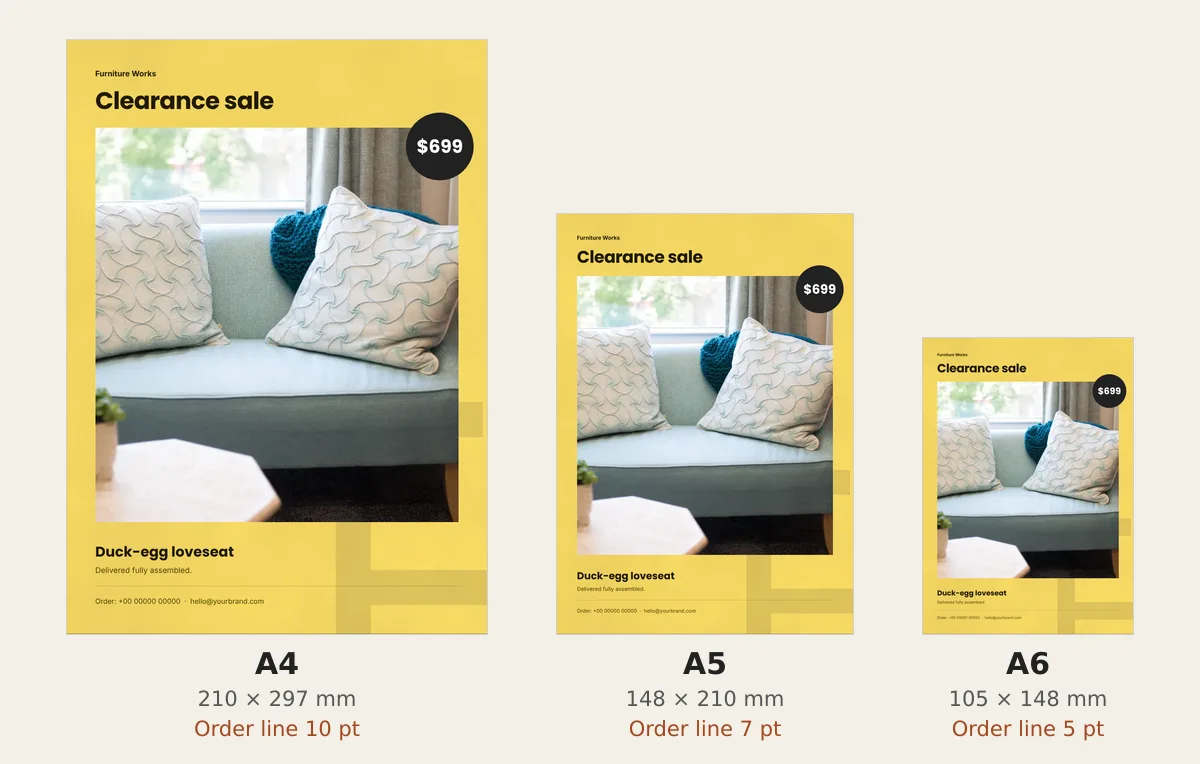
For most shops the best flyer format size is A5. It is half of A4, so an A4 design fits with nothing cut. In our test the order line fell from 10 pt to 7 pt.
Many shops design a flyer on A4, then ask the print shop for A6 hand-outs. The design shrinks to half its width. Your phone number shrinks with it, to 5 pt.
Your flyer format size sets how big every word prints. We scaled one free flyer design to each common size and worked out the numbers.
The common sizes in one table
| Size | Millimetres | Inches | Cut from one bigger sheet | Good for |
|---|---|---|---|---|
| A4 | 210 × 297 | 8.3 × 11.7 | — | A shop window or a notice board |
| A5 | 148 × 210 | 5.8 × 8.3 | 2 from A4 | The counter, a shopping bag, a hand-out |
| A6 | 105 × 148 | 4.1 × 5.8 | 4 from A4 | A card left with a delivery |
| DL | 99 × 210 | 3.9 × 8.3 | 3 from A4 | A tall list of prices or services |
| US Letter | 216 × 279 | 8.5 × 11 | — | A wall in the US or Canada |
| Half letter | 140 × 216 | 5.5 × 8.5 | 2 from Letter | A hand-out in the US or Canada |
The A sizes come from the ISO 216 paper standard. Most of the world buys paper in them. The US and Canada use Letter instead.
One flyer, three sizes
We used the free Clearance flyer in CatalogLeaf. Its sample shop, Furniture Works, sells a duck-egg loveseat for $699. The flyer is A4. We read the size of each line of text from the design itself.
Letter size is measured in points, or pt. A point is a fixed size, a little over a third of a millimetre. When a print shop shrinks A4 to A5, every point shrinks to about 0.7 of a point. At A6, it becomes half a point.
| Line on the flyer | A4 | A5 | A6 |
|---|---|---|---|
| Headline: "Clearance sale" | 34 pt | 24 pt | 17 pt |
| Price in the badge: "$699" | 26 pt | 18 pt | 13 pt |
| Product name | 20 pt | 14 pt | 10 pt |
| Line under the name | 11 pt | 7.8 pt | 5.5 pt |
| Order line: phone and email | 10 pt | 7 pt | 5 pt |
The headline and the price still read well at A6. The bottom two lines do not. At A6, the phone number is half as tall as it was on the A4 design. That is the line a customer needs most.
The photo is fine at any smaller size. The same picture on less paper only looks sharper.
Why A4 turns into A5 so neatly
Every A size has the same shape. Cut an A4 sheet in half across, and you get two A5 sheets of the same shape. Cut again, and you get A6.
So an A4 design scales down to A5 or A6 with nothing cut off and no blank edge. The print shop only has to shrink it.
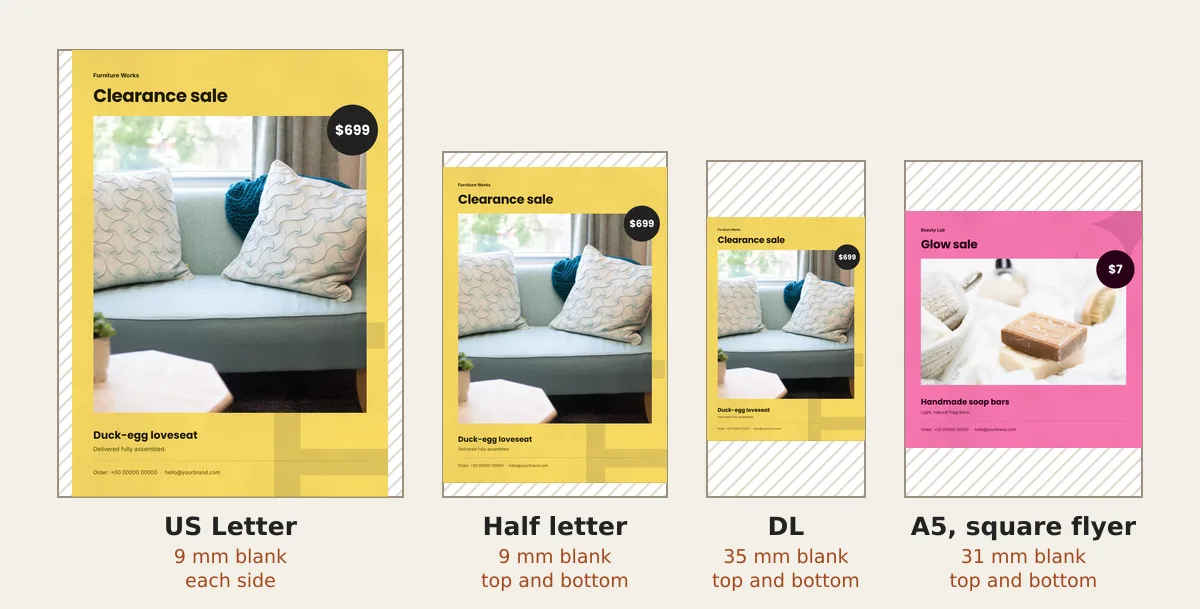
US sizes do not work like this. Letter is 8.5 × 11 inches. Half letter is 5.5 × 8.5 inches, a longer and thinner shape. A Letter design on half letter leaves 1.4 inches blank, or the shop crops your edges to fill it.
The sum, if you want it: to fit the 5.5-inch width, the design shrinks to about two thirds (5.5 ÷ 8.5). It then fills only 7.1 of the 8.5 inches. The picture shows the same problem with our A4 flyer on US paper.
Square and DL flyers need their own design
A flyer made for Instagram or WhatsApp status is often square. Square suits a post on a screen. On paper, it wastes space. We fitted our pink Glow Sale flyer onto A5. It left 31 mm blank at the top and bottom.
DL is a tall, thin strip. An A4 design squeezed onto it shrinks to under half its width. It leaves 35 mm blank above and below, and the order line drops below 5 pt. For DL, start a new design in that shape, or pick A5 instead.
Which size to pick
- A5 if you hand flyers out at the counter or drop one in each bag. It is big enough to read in the hand, and one A4 sheet makes two.
- A4 for a window or a notice board, where people read from a step away.
- A6 for a small card left with a delivery, but only after you enlarge the bottom lines.
- Half letter in the US or Canada, designed in its own shape.
For most small shops, our pick is A5. Design once on A4. Print posters at A4 and hand-outs at A5.
Getting an A5 or A6 flyer from CatalogLeaf
CatalogLeaf makes flyers in A4 portrait or square. There is no A5 setting, and you do not need one.
- Open the Clearance flyer, or another A4 design from the sale flyer templates. Click Use with my photos.
- Make your flyer, then download one PDF for the A4 poster before you change sizes.
- Click the order line at the bottom of the page. In the panel, set Size to 14 pt for A5 or 20 pt for A6. Both print at about 10 pt. If the line runs out of room, keep the phone number and cut the email.
- Do the same for the line under the product name: 15 pt for A5, 20 pt for A6.
- Click PDF at the top, pick HD and click Create PDF. The words in the file are real text, not a picture, so they stay sharp at any size.
Then ask the print shop to scale the A4 file to A5 or A6, with no cropping. For paper and printer tips, read how to print your catalog.
Before the shop prints 500, ask for one copy. Hold it at arm's length and read your phone number.
Video templates · New
Turn your products into a video
Pick a design, add your words and photos, and watch it play: made for WhatsApp Status, Reels and Shorts.
Try a video template