
Lookbook size: pick the page, then shoot for it
For most small shops, the best lookbook size is A4 portrait (210 × 297 mm). It suits upright phone photos, prints on A5 with nothing cut, and needs 1240 to 2480 pixels across each full-page photo.
Many shops shoot the photos first and think about lookbook size later. Then a tall page cuts a wide photo, and half a boot goes missing.
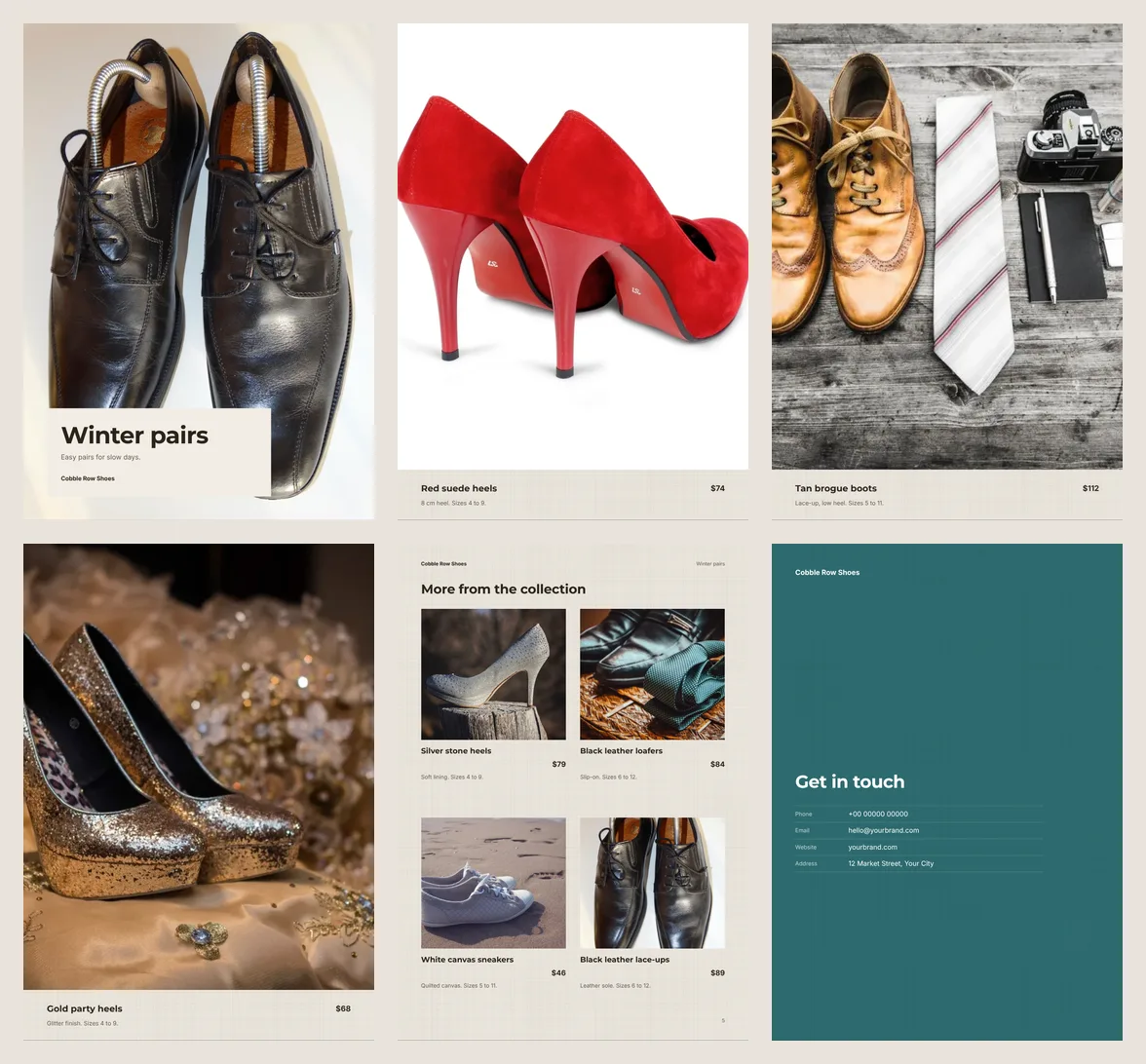
A lookbook is a short book of big photos for a new collection. Ours is for Cobble Row Shoes, a made-up shoe shop with seven winter pairs. It sells at the counter and sends the book to past buyers before the season starts.
Use A4 portrait, which is 210 × 297 mm. In the US, print the same file on Letter paper. Then shoot your best pairs to fit that tall page.
Count your upright photos
We had seven photos. Only one was upright: the black lace-ups, taken from above. One was square, the red suede heels. The other five were wider than tall, like most photos taken with the phone held sideways.
Count yours the same way. Every lookbook design on CatalogLeaf is A4 portrait, so the page will not change shape for you. The photos have to fit it.
Wide photos lose up to half
We measured the photo frames in all 29 of these designs. In 24, the cover photo fills the whole page. The next three photos are 210 × 267 mm each, with one short line under them.
That frame is a little wider than an upright phone photo. So an upright photo loses only about 5% of its height. A square photo keeps 79% of its width. A sideways phone photo keeps just 59% of its width, and our wider boot photo kept 52%.
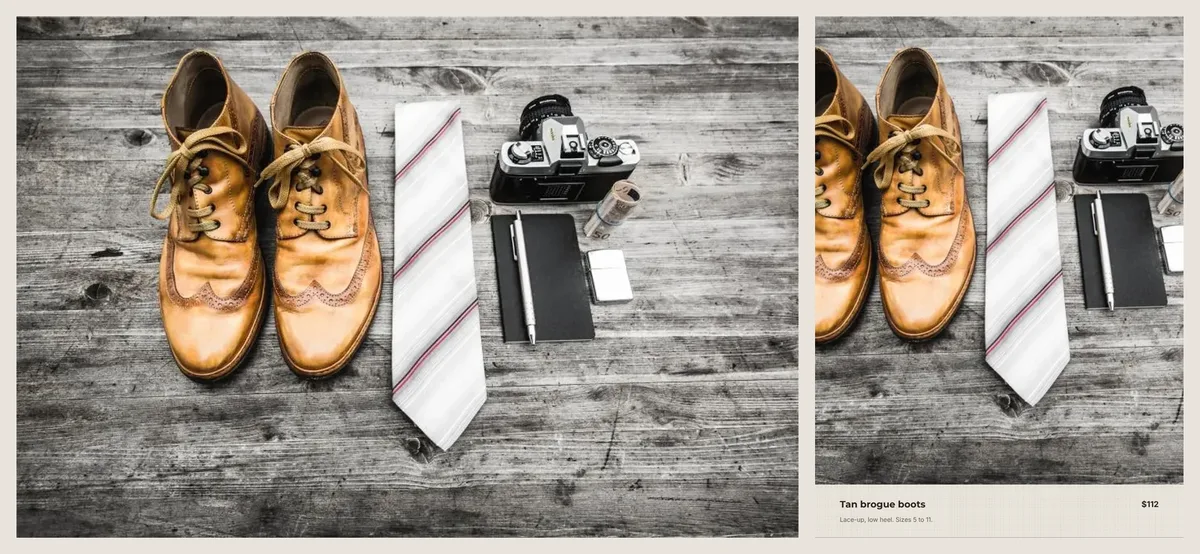
On the boots page, only half of the left boot made it in. The camera was cut at the edge.
Which photos go first
Pages 1 to 4 get the big frames. In our design, the fifth pair onward share one page, "More from the collection", in smaller frames. The cover pair appears there again, with its price.
So we put the upright lace-ups first, for the cover. The square red heels came second. The wide photos went later, where small frames cut them less.
Shoes are long, so a pair side by side makes a wide photo. For an upright one, shoot a single shoe from the front at an angle. Or stand the pair heel to toe and shoot from above, as with our lace-ups.
A4 also prints on A5 and Letter
A5 is exactly half of A4, with the same shape. This is how the ISO 216 paper sizes work: fold one in half and you get the next size down. So a print shop can print your A4 file on A5 paper. Everything shrinks to 71%, and nothing is cut.
US Letter is 8.5 × 11 inches, a slightly wider shape. Our lookbook designs come in A4 only. Printed to fit Letter paper, our A4 page came out at 94% size. That leaves a white strip about 9 mm wide down each side. Keep the strips, or ask the print shop to trim them off.
Sending it as a PDF only? Then shape matters more than size. An upright page fills a phone held upright. See the phone test in catalogue page size.
How many pixels each photo needs
When you download the PDF, CatalogLeaf asks you to pick a quality. HD prints photos at up to 300 dpi. That means 300 image dots in each inch of paper. Below 150 dpi, the app warns that a photo "may look soft in print".
A full-page photo is 210 mm, or 8.27 inches, wide. Here is the sum:
| Pixels across the photo | Result | |
|---|---|---|
| A4, sharpest | 8.27 × 300 = 2480 | 300 dpi, the HD limit |
| A4, lowest | 8.27 × 150 = 1240 | 150 dpi, the lowest sharp size |
| A5, same file | 1240 | 1240 ÷ 5.83 = 213 dpi |
A sideways photo needs more, because its edges are cut off. A 12-megapixel photo, 4032 × 3024 pixels, came to 288 dpi on our A4 page when taken sideways. Taken upright, it came to 366 dpi, more than HD needs.
So most phone photos are big enough. The risk is a photo someone sent you on WhatsApp, which shrinks photos. Use the original file from the phone that took it.
Make the shoe lookbook
- Open the free Weekend lookbook, the design we used, and click Use with my photos.
- Under Add your looks, add your photos. Use the up and down arrows on each look to put the upright ones first.
- Type each name and price, and one short line about the look.
- Click Next: choose a design, type your shop name, then your own Title.
- Click Create lookbook. Then click PDF, choose HD and check the line under it before you click Create PDF.
If that line names a soft photo, it also says which page it is on. Swap in the original and check again.
Eight pairs or twenty, the first four still get the big pages. Give those four your best upright photos.
Turn your products into a video New
Pick a design, add your words and photos, and watch it play: made for WhatsApp Status, Reels and Shorts.