A new arrivals flyer design customers can act on
A good new arrivals flyer design shows one product, its price, how many you have and how to order. In our test, a short headline printed 25% bigger, and cutting the sales talk made the photo 35% larger.
Our first toy flyer had a 14-word headline, 56 words of praise and no price. It took us one free design and one photo to make. It also gave a parent no reason to reply.
So we fixed it. Below is the new arrivals flyer design before and after, with what each change did to the page.
The shop and the first try
Pebble Lane Toys is our made-up shop. In late November, parents start asking for stocking fillers, and a box of yellow tin vans has just come in. The owner wants the parents on their WhatsApp list to see the vans this week.
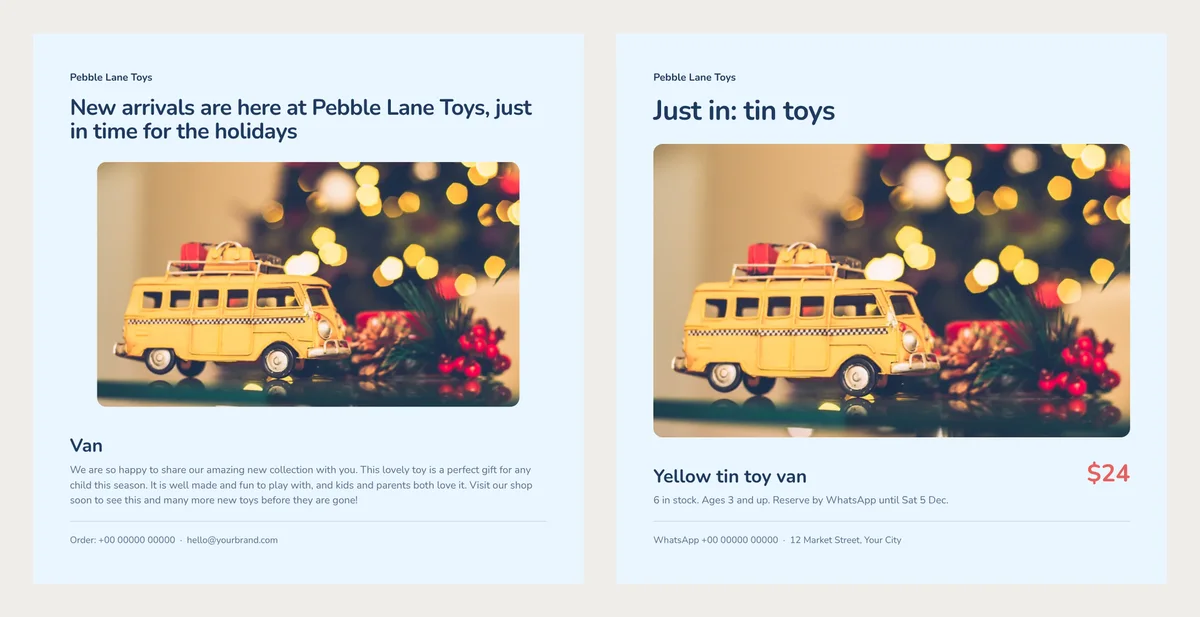
The first flyer said "New arrivals are here at Pebble Lane Toys, just in time for the holidays." The van was called "Van". A friendly paragraph praised the new collection. The price was left out, because "they can ask."
A four-word headline printed 25% bigger
The design shrinks a long headline until it fits on two lines. Our 14 words came out at 24.7 pt (points, the unit for text size). "Just in: tin toys" fits on one line at 30.9 pt.
The shop name already sits at the top, so the headline doesn't need it. Name the new thing instead. A parent knows at once if it is for them.
For a weekly flyer with several toys, use one headline for all of them, such as "New this week". For one special delivery, name it, as we did.
Name and price on one line
"Van" could be any toy. A parent who wants one would write "the yellow tin van". So that became the name: Yellow tin toy van. Use the words a customer uses to tell your items apart, such as colour or material.
Next to the name, the fixed flyer shows $24 in the design's red. At 26.7 pt, the price is bigger than the name. A flyer without a price makes every customer ask first. If the price may change, show today's price. Next week's flyer can carry the new one.
Three facts made the photo 35% larger
The first flyer called the van "a perfect gift" that "kids and parents both love." A parent can't check any of that. We swapped all 56 words for one line: "6 in stock. Ages 3 and up. Reserve by WhatsApp until Sat 5 Dec." The small stock number also tells people not to wait.
The shorter text changed the photo too. This design shows the whole description first and gives the photo the space that is left. With three lines of praise, the photo was 470 × 272 pt. With one line, it grew to 530 × 326 pt.
For your own photo, put the toy on a plain table near a window. Take it from the side, at the toy's height, as a child would see it.
The sample order line
The design ends with a sample line: "Order: +00 00000 00000 · hello@yourbrand.com". Our first flyer still had it. A customer who wanted the van had no real number to call.
We changed it to a WhatsApp number and a street address. Ours are placeholders, because the shop is made up. Put the way you answer fastest. If you rarely check email, leave it out.
One toy per flyer, three flyers a week
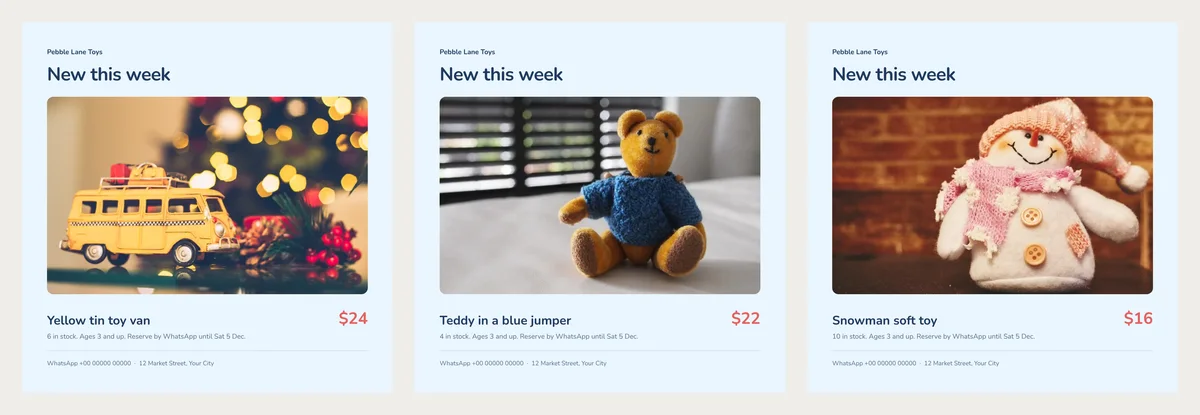
The New in Store design gives each product its own page. So six toys make six flyers, and each keeps a big photo and a clear price. We added three toys and got three flyers. As a Compact PDF, all three came to 196 KB.
Send your best two or three new toys this week. Keep the rest for next week, so parents hear from you more than once. When a toy sells out, say so in your chat, and offer to hold one from the next box.
Before you send it to a phone
Our square page is 216 mm wide. In a chat, a typical phone shows it about 7 cm wide, roughly a third of that. So the 10 pt order line looks like 3 pt text, too small to read without zooming in.
So type the price, the stock and your number in the message as well. Send it to your broadcast list, and print one copy for the counter.
Choking warnings in the US
Selling toys in the US? A phone number for orders makes a printed flyer a "direct means of purchase" under 16 CFR 1500.20. So if a toy's box carries a choking hazard warning, the flyer must carry it too. "Ages 3 and up" alone is not that warning. Copy the warning from the box, word for word, and add it wherever you share the flyer. In other countries, check your own rules.
From photo to finished flyer
- Open the free New in Store flyer and click Use with my photos.
- Add one photo for each new product. Type its name and price, then one line of facts in the box under them, "A sentence or two about it".
- Click Next: choose a design. Type your shop name, and put your short headline in Title.
- Click Create flyer. Then double-click the order line at the bottom and type your own number.
- Click PDF, pick Compact and click Create PDF.
Printing more for the counter? Our guide to flyer sizes shows what happens to small text on a smaller sheet.
Next Friday, change the headline to "New this week", swap in the teddy, and update its stock count.
Turn your products into a video New
Pick a design, add your words and photos, and watch it play: made for WhatsApp Status, Reels and Shorts.