
Lookbook design ideas beyond one big photo a page
Good lookbook design ideas mix page types. Give your three best looks a full page each, then use pairs, a shop-the-look page or rows for the rest, and end with a numbered list.
The best lookbook design ideas mix page types. Your three best looks get a whole page. The rest share pages built for two or three, and a numbered list closes the book.
A lookbook is a short book of big photos for one collection. Below are seven page ideas you can copy in any tool.
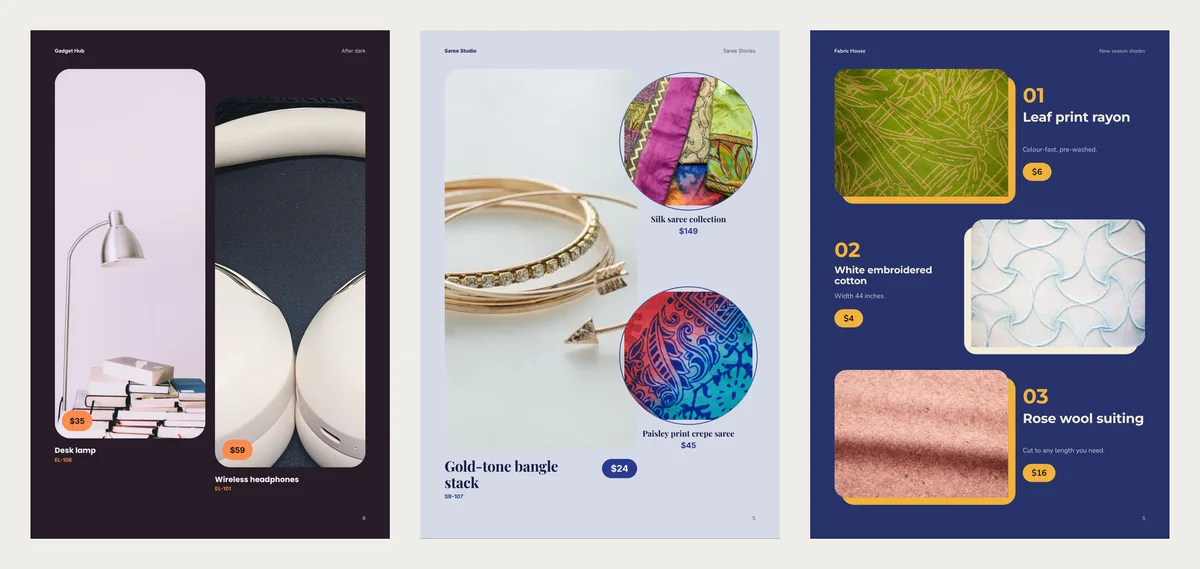
Photo sizes in four designs
Many lookbooks give a few looks a full page and put the rest in a grid. With twelve looks, most end up small.
We put the same 12 looks into four free CatalogLeaf lookbook designs. Each look had a photo, a name, a price, a code and one short line. We read each photo's size from the page layout. The pages are A4, which is 210 × 297 mm.
| Page layout | Looks on one page | Photo size on A4 |
|---|---|---|
| Full-page photo | 1 | 210 × 297 mm, the whole page, in Night Stage |
| Arch photo | 1 | 109 × 233 mm above the name |
| Photo and colour chips | 1 | 167 × 175 mm, with three chips |
| Tall photo pair | 2 | 88 × 216 mm each |
| Shop the look | up to 3 | 113 × 223 mm, plus two circles 75 mm wide |
| Alternating rows | up to 3 | 102 × 75 mm each |
| Grid in a plain lookbook | up to 6 | 87 × 37 mm each |
| Hanging shade card | up to 9 | strips 17 mm wide |
| Numbered line-up | up to 17 | 14 mm circles, when 12 looks share the page |
The fourth design, Monochrome, uses the plain plan. There, 9 of our 12 looks landed in that grid. Each of those photos was only 37 mm tall. The other three designs did better. Every look got a photo at least 75 mm on its short side. Only the lists at the back were smaller.
On a phone, the whole page shrinks to fit the screen. A photo that is small on paper is even smaller there.
1. Keep the full page for three looks
Use the full page for the look you most want to sell, and for two more at most.
Shoot these photos upright. A tall page cuts the sides off a wide photo.
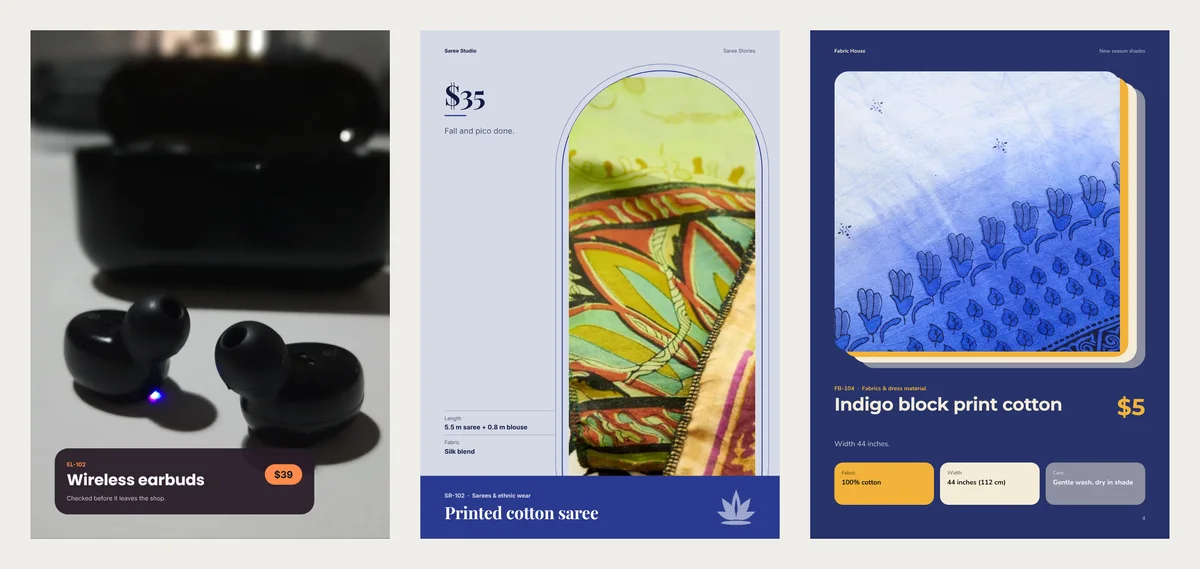
2. Put two tall looks side by side
The Tall photo pair shows two looks on one page. The right photo sits a little lower than the left, so the page does not look like a grid.
Each photo is still 88 × 216 mm, taller than a postcard. The price sits on a small tag in the photo's corner. There is no room for a long line here. Put one fact in the name, like "Linen shirt, sizes S to XL".
3. Build a shop-the-look page
Shop the look puts one big photo on the left. Two round photos on the right show other pieces, each with its name and price.
Use it to sell a set, not one item. In our sample, a bangle stack sits beside two sarees. For clothes, the big photo could show a dress, with the bag and earrings in the circles.
4. Frame a calm look in an arch
The Arch photo page puts the photo in a tall window with a round top. The price sits large beside it, with one line and two short facts below.
The arch hides the photo's edges, so a busy shelf behind matters less. It suits sarees and bridal pieces.
5. Add fact chips under the photo
Photo and colour chips gives one look a big photo with three small boxes under it. Each box holds one fact, such as fabric, width or care. Despite the name, the chips hold facts, not colours.
Use them when the same three questions come up every day. The boxes show the first three details you add to a look.
6. Run three looks down the page in rows
Alternating rows stacks three looks. The photo swaps sides on each row. Beside it sit a big number, the name, one line and the price.
Each photo is 102 × 75 mm, about the size of a playing card held sideways. Use close-ups here, not full outfits.
7. Open with your story and close with a list
A Story opener page goes right after the cover. It holds a heading, one short paragraph, a wide photo and three short promises, like "Free alterations".
At the back, a Numbered line-up lists your looks with a small round photo, a number and a price. Customers can then write "I want 4 and 7" on WhatsApp. It fits up to 17 looks on one page. Fabric shops can use the Hanging shade card instead, with up to nine looks as tall strips.
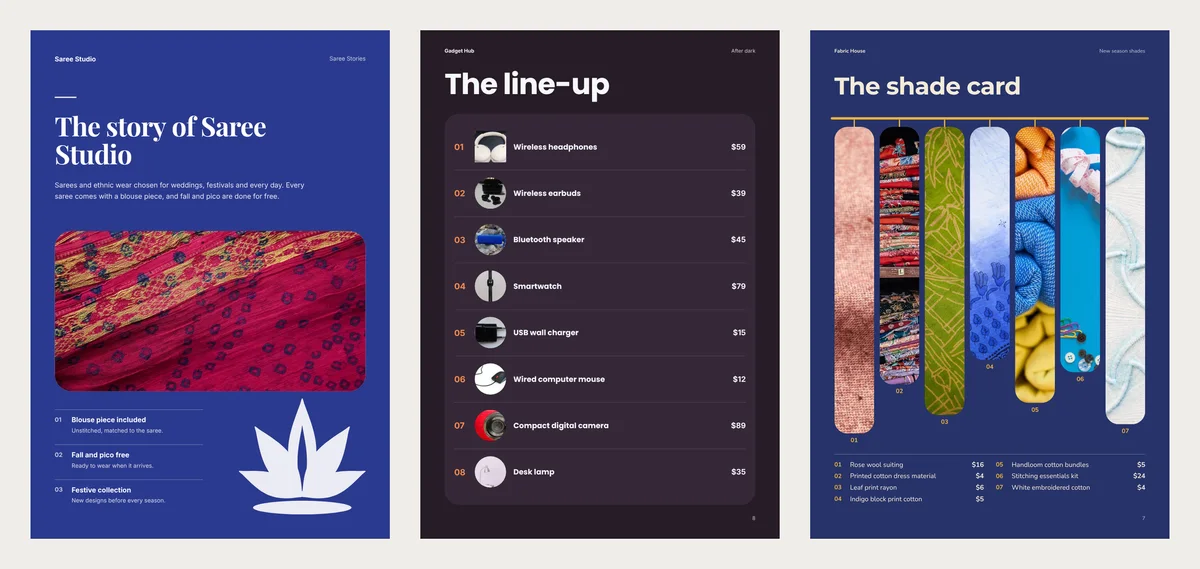
A running order for 12 looks
One plan that keeps every look visible:
- The cover, with your best look.
- A story page.
- Three full pages for your three strongest looks.
- Two pages of tall pairs: four more looks.
- One shop-the-look page: a set of three pieces.
- A page of rows for two close-ups.
- A numbered line-up of all 12, then your contact page.
That makes 11 pages, and all 12 looks appear in the list.
Mix these pages in CatalogLeaf
Each idea above comes from one of three free designs. The sample shop names and photos are only there until you add your own.
- Night Stage: full-page photo, tall photo pair, numbered line-up.
- Lotus Arch: story opener, arch photo, shop the look.
- Shade Card: photo and colour chips, alternating rows, hanging shade card.
Click Use with my photos and add your looks. To add facts for the chips, open More details on a look. Then click Next: choose a design and Create lookbook.
In the editor, click Add page. The window lists your design's own pages under "From your template". Pick one, choose the looks for it, then drag the page into place.
For captions, prices and how to order, read how to make a fashion lookbook. More designs are on the lookbook maker page.
Before you send it, open the PDF on your phone. If a look is smaller than your thumb, move it to a pair or a row.
Video templates · New
Turn your products into a video
Pick a design, add your words and photos, and watch it play: made for WhatsApp Status, Reels and Shorts.
Try a video template